Evaluations
An evaluation measures how well an agent solves a set of tasks. You write the tasks, run them with Harbor, then score the results, find why tasks failed and compare two runs. This page shows each step from an empty folder to a score.
When to use
- You want to know if Vis can do a type of work, for example renames. Write a task, then run it.
- You changed a prompt, a tool or a model and want proof that it helps. Run the same tasks before and after the change, then compare the two runs.
- You must decide if a change goes in, and you are not sure which number to trust. Read Decide from the results.
- An agent must improve Vis with evaluations, without a person at each step. Give it Improve an agent with evaluations.
- You ran a benchmark, for example Terminal-Bench, and want the score with its uncertainty. Read Scores and intervals.
- You want all numbers of a run at once. Report the round with one command.
- You want to know why the agent failed tasks. Read Failure causes.
- You are not sure that your tasks measure the agent and not the task text. Read Write a fair task.
- You want to know if the failure causes or a judge are reliable. Read Check the causes with labels.
- The agent must call a function of your extension, but the real function must not run. Replace the extension with a mock.
- Your users give a request over several messages, and you want to test that conversation. Write a task with several turns.
- You want a published benchmark of such conversations. Import Lost in Conversation.
- You want to know if Vis still remembers early facts when a conversation is larger than the model's context. Import LongMemEval.
- You want to know if Vis can repeat an earlier answer word for word from a long conversation. Import MRCR.
- You want to know if one prompt rule helps on the same tasks. Add a rule to the system prompt.
- You want to know how Vis and Harbor share the work. Read Vis and Harbor.
- Your own program must do these steps. Read Evaluations API.
To watch a single session while it runs, use Sessions. To run a prompt on a schedule, use Automations.
Vis and Harbor
Harbor is an open framework for agent evaluations. Vis uses it as its only task runner. Each tool does a different part of the work:
| Part | Harbor | Vis |
|---|---|---|
| Task format | Defines the task folder: task.toml, instruction.md, environment/ and tests/. |
Adds tests/checks.json, which its grader reads. |
| Run | harbor run starts a job and runs one trial for each task and attempt. |
Gives the VisAgent agent and the HostEnvironment environment. |
| Verifier | Runs tests/test.sh after the agent and reads the reward. |
Gives the grader python -m blockether.vis.evals.grade. |
| Results | Writes a job folder with one result.json for each trial. |
Writes the agent trajectory in the Harbor ATIF format. |
| Analysis | harbor view shows the trials in a browser. |
Gives scores with intervals, failure causes, label checks and paired comparisons. |
The Vis setup is different from the Harbor defaults in three ways:
- No containers. Harbor usually runs each trial in Docker.
HostEnvironmentruns each trial in a new git repository on your computer. The agent can read files outside that repository, so run only tasks that you trust. - A Vis grader. A standard Harbor verifier runs tests, for example
pytest, and writes a reward. The Vis grader also reads the agent trajectory. It can check the answer, the tools that the agent used and its errors, not only the files. - Scores for every agent. The analysis reads only standard Harbor files. It scores a job of any Harbor agent, for example Claude Code or Codex, in the same way.
For the Harbor concepts, read the Harbor core concepts and the task overview.
The steps of this page pass these files from one to the next:
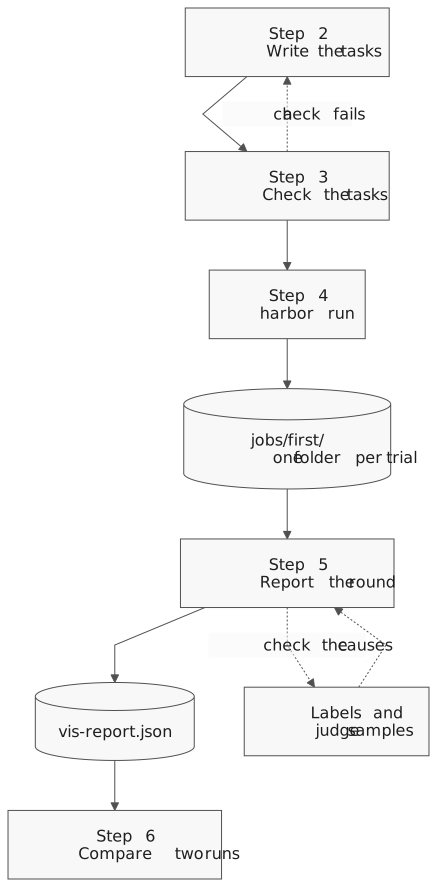
Step 1: Install the tools
You need Python 3.12 or later and a configured provider and model. Read Configuration for the provider.
Install the SDK. It installs Harbor 0.24.0 with it:
python3 -m venv .venv
. .venv/bin/activate
python -m pip install vis-agent
harbor --version
The last command shows 0.24.0. You do not have to install Vis. When vis-agent is missing or another release,
the first run downloads the Vis release of the SDK once. Each trial makes paid model calls. A task
with one attempt costs one agent run.
Step 2: Write a task
A task is one folder. The folder name is the task name. This example asks the agent to add one function to a Python file:
tasks/
  add-function/
    task.toml
    instruction.md
    environment/workspace/m.py
    tests/checks.json
    tests/test.sh
task.toml sets the time limits in seconds:
[metadata]
lang = "python"

[agent]
timeout_sec = 300.0

[verifier]
timeout_sec = 300.0
instruction.md is the prompt that the agent gets:
In m.py add a new function c that returns 3, placed after b. Keep a and b unchanged.
environment/workspace/ holds the seed files. Each trial starts with a copy of them in a new git
repository. Here, m.py defines the functions a and b.
tests/checks.json tells the grader what a correct result is:
{
  "want": {"m.py": ["def c(", "return 3", "def a(", "def b("]},
  "wantnot": {}
}
tests/test.sh runs the grader. Use it without changes:
#!/usr/bin/env bash
# Grade the trial. The Vis host environment sets the VIS_HARBOR_* paths.
set -euo pipefail
exec "$VIS_HARBOR_PYTHON" -m blockether.vis.evals.grade "$VIS_HARBOR_TESTS/checks.json"
Make the script executable with chmod +x tasks/add-function/tests/test.sh. To write the same
folder from Python, use write_task.
Choose the checks
A trial passes only when all its checks pass. These are the checks that most tasks need:
| Key | What it checks |
|---|---|
want |
Each named file holds each text. |
wantnot |
No named file holds any of its texts. |
want_answer |
The final answer of the agent holds each text. |
want_answer_program |
A Python file in tests/ accepts the final answer. |
want_json_files |
Each named file is JSON Lines with exactly these rows, in this order. |
want_tools |
The agent used each named tool. |
forbid_tools |
The agent did not use any named tool. |
max_patch_calls_per_file |
The agent changed each file with at most this number of successful patch calls. |
max_total_output_chars |
The tool output of the run stayed below this size. |
want_answer_program names a file relative to checks.json, for example "check_answer.py". The
file gets the answer on its standard input. Exit code 0 accepts the answer. Any other exit code fails
the check, and the last line of the error output becomes the failure detail.
The grader always checks that the agent finished without an error. The e2e/ folder of the Vis
repository has 42 tasks that use these checks. Read them for more examples.
To test a project with its own test suite, write a standard Harbor verifier instead. Read the Harbor guide Create a task.
Write a fair task
A task that tells the agent the answer measures the instruction, not the agent. Use these rules for each task. They follow the Anthropic guides in References.
- Describe the goal, not the solution. Give the result and the limits that a person needs.
Do not copy the texts of
wantinto the instruction, unless the exact format is a requirement. - Make the task unambiguous. Two experts who read the instruction must agree on pass or fail. Each check must follow from the instruction. A check on a file that the instruction does not name fails good agents.
- Prove that the task can be solved. Write a reference solution and make sure that it passes all checks. A task that nobody can solve gives 0% for every agent.
- Test both directions. Add tasks where the correct action is to change nothing, for example
a file that must stay the same. Check it with
wantnot. A set of only "change it" tasks rewards an agent that always changes files. - Grade the result, not the path. Check the files and the answer. Use
want_toolsandforbid_toolsonly when the tool is a requirement, as in the mock example. - Keep the solution out of the trial. The seed files must not hold the solution, a solved
copy or a hint in a comment.
HostEnvironmentlets the agent read files outside its repository, also thetests/folder of the task. Look for such reads in the trajectories. - Give a judge a rubric and a way out. When a model grades the result, give it a detailed rubric. Ask for the reason before the score, and let it answer that it does not know. Then check the judge with labels.
- Replace tasks that every run solves. A task that always passes cannot show a change.
After each change of the tasks, read some passed and some failed trajectories. Some broken tasks show only there, for example a check that passes for the wrong reason.
Replace an extension with a mock
A task can test an agent that uses a function of your own extension, for example
mylib.send_some_huge_payload. In an evaluation, you usually do not want the real function to
send data. Put a mock extension in the seed files instead. The mock returns a made-up answer and
writes one line for each call.
Vis loads the extensions of the project from .vis/extensions/ in the workspace. A project
extension replaces a global extension with the same name, so the agent calls the mock and the
real function does not run. The mock replaces the whole extension, so copy each function that
the agent needs. Keep the names, the parameters and the docstrings the same as in the real
extension. The agent then sees the same contract.
This mock writes the target, the size and the SHA-256 hash of each payload, not the payload:
"""Mock of mylib for evaluations: it records each call and sends nothing."""

import hashlib
import json
from pathlib import Path

import blockether.vis.extension as sdk

# The workspace root is two folders above .vis/extensions/.
LEDGER = Path(__file__).resolve().parents[2] / "payload-calls.jsonl"


class Payloads:
    @sdk.method(
        tag="mutation", activity=sdk.Activity(label="Send payload", show_start=False)
    )
    def send_some_huge_payload(self, target: str, payload: str) -> dict:
        """Send one payload to a named target. Returns the status and the job id."""
        calls = LEDGER.read_text().count("\n") if LEDGER.exists() else 0
        row = {
            "target": target,
            "size": len(payload),
            "sha256": hashlib.sha256(payload.encode()).hexdigest(),
        }
        with LEDGER.open("a") as stream:
            stream.write(json.dumps(row, sort_keys=True) + "\n")
        return {"status": "accepted", "id": f"job-{calls + 1}"}


sdk.register_extension(
    sdk.Extension(
        name="mylib",
        alias="mylib",
        description="Send payloads to the report service.",
        symbols=[sdk.Symbol(Payloads(), name="mylib")],
    )
)
Save it as environment/workspace/.vis/extensions/mylib.py. Then check the calls in
tests/checks.json:
{
  "want_tools": ["mylib.send_some_huge_payload"],
  "want": {
    "payload-calls.jsonl": ["\"target\": \"north\"", "\"target\": \"south\""]
  },
  "want_answer": ["job-1", "job-2"]
}
want_toolspasses when the agent called the function at least once without an error.wantchecks each call in the record. Add one text for each call that you expect.want_answershows that the agent used the answers of the mock.
The record must also stay after the trial, because the workspace of a trial is temporary. Name
it in artifacts at the start of task.toml, before the first table:
artifacts = ["payload-calls.jsonl"]

[metadata]
After the check, Harbor copies the file to artifacts/payload-calls.jsonl in the trial folder.
artifacts/manifest.json gives the status of each file: ok, or failed when the file is
missing. A missing file does not change the reward. write_task writes this line when you give
artifacts.
Write a task with several turns
People rarely give a whole request in one message. They start with a short request, read the answer, then add a detail or ask a follow-up question. Each of these messages is a turn. A task with several turns tests if the agent follows the whole conversation, not only the first message.
Write the messages in instruction.md. Put a line with only <!-- vis:turn --> between two
messages:
Write a function `total` in `total.py` that adds numbers.
<!-- vis:turn -->
The input is a list of integers.
<!-- vis:turn -->
Return 0 for an empty list.
From Python, give write_task a list with one string for each message. It writes
the same file:
from blockether.vis.evals import write_task

write_task(
    "tasks",
    "sum-list",
    [
        "Write a function `total` in `total.py` that adds numbers.",
        "The input is a list of integers.",
        "Return 0 for an empty list.",
    ],
    {"want": {"total.py": ["def total("]}},
)
This check only shows that total.py defines the function. To test the rule of the last turn, add a
test that calls total([]).
This is how the Vis agent runs the task:
- It starts one Vis session, sends the first message and waits until the answer is complete.
- It sends the next message to the same session. The agent sees the earlier messages, its own answers and its tool results, as in a chat in the app.
- It does step 2 again for each remaining message.
- After the last message, Harbor runs the checks once. They grade the last answer and the files in the workspace.
If a turn ends with an error, the agent sends no more messages, and the checks fail the trial. A conversation that grows larger than the context window of the model also fails the trial, because the agent controls the size of its context. If the provider is not available, for example because your quota is used up, the trial has no score. The round report lists it as unscored.
The time limit of the task covers all turns together. Set it with agent_timeout_sec of
write_task, or with timeout_sec in the [agent] table of task.toml.
Other Harbor agents get the whole file, with the marker lines, as one prompt. To compare Vis with and without turns, write a second folder with the same task names that gives all messages in one string.
The trial folder keeps the trajectory of each turn in agent/turns/1.json, agent/turns/2.json and
so on. agent/trajectory.json joins all turns, and its totals add up the tokens and the cost of
each turn.
Each turn sends the whole conversation to the model again, so every turn makes the next request larger. A model can read only a fixed number of tokens in one request. Before that limit, the agent can fold old turns: it replaces them with a short note that it writes itself. A fact that is not in the note is lost. To measure what the notes keep, import LongMemEval.
Step 3: Check the tasks
A bad task gives wrong scores. For example, its instruction does not name a file that its checks need. Review each task with the Harbor check rubric:
python -m blockether.vis.evals.check tasks --provider zai-coding-plan --model glm-5.3-flash
The Vis agent reviews each task. The command shows a table of the checks and writes
check_report.json in a job folder under jobs/vis-check/. Each check makes paid model calls. Correct each task that fails a check before you run it.
Step 4: Run the tasks
Run all tasks of the folder with the Vis agent:
export HARBOR_TELEMETRY=off
harbor run --path tasks \
  --agent blockether.vis.evals.agent:VisAgent \
  --env blockether.vis.evals.environment:HostEnvironment \
  --model zai-coding-plan/glm-5.3-flash \
  --jobs-dir jobs --job-name first --n-attempts 1
HARBOR_TELEMETRY=off stops Harbor from sending usage data. --n-attempts sets the trials for
each task. pass@k and pass^k need at least k attempts for each task. More
attempts give a smaller interval but cost more. To test a Vis checkout, add --ak source=PATH. To test a raw native image, add --ak native_bin=PATH.
Add a rule to the system prompt
A prompt rule is a sentence that you add to the instructions of the agent. An example is "Fold old turns before the context budget is full." To learn if a rule helps, measure the same tasks with and without it:
- Write the rule in a Markdown file, for example
rule.md. - Run the tasks without the rule, as in the command above.
- Run the same tasks again with
--ak append_system=rule.mdand a new--job-name. - Compare the two runs.
harbor run --path tasks \
  --agent blockether.vis.evals.agent:VisAgent \
  --env blockether.vis.evals.environment:HostEnvironment \
  --model zai-coding-plan/glm-5.3-flash \
  --jobs-dir jobs --job-name with-rule --n-attempts 1 \
  --ak append_system=rule.md
Give an absolute path, or a path relative to the folder where you run harbor. Each trial writes
the text of the file to .vis/APPEND_SYSTEM.md in its workspace. Vis adds that file at the end of
its system prompt. This option needs the HostEnvironment environment. If a task already has
.vis/APPEND_SYSTEM.md, the trial stops with an error and does not replace the file.
Vis also reads ~/.vis/SYSTEM.md, ~/.vis/APPEND_SYSTEM.md and the system_prompt setting of
your account in every trial. Keep them the same for both runs, or the comparison measures them too.
Import Lost in Conversation
Lost in Conversation is a published benchmark. It tests if a model still solves a problem when the user gives the problem in small parts over several turns. This command downloads the data once, about 30 MB, and writes the math (GSM8K) and HumanEval code tasks:
python -m blockether.vis.evals.lic tasks-lic --cache lic.json
python -m blockether.vis.evals.lic tasks-lic-concat --cache lic.json --mode concat
The two folders give the same problems in a different form:
tasks-licgives one part of the problem in each turn.tasks-lic-concatgives all parts in one turn. This is the CONCAT control of the paper. The importer does not write the FULL control, which is the original problem in one message.
Each folder has 148 tasks: 103 math tasks and 45 code tasks. Both folders have the same task names,
so you can compare the two runs. The difference in score shows what the split
into turns costs the agent. Use --task math or --task code for one type. --limit N keeps the
first N tasks of each type.
Each task grades the final answer with a program in tests/check_answer.py. The math program
follows the grader of the benchmark. The code program runs the HumanEval tests on the last Python
block that defines a function.
The parts come in a fixed order, not from a simulated user as in the original benchmark. The last turn also says that all details are given. Compare your scores with each other, not with the published scores.
These conversations are short, a few thousand tokens. They test if the agent combines the parts of a request. They do not test what the agent keeps when the conversation becomes too long.
Import LongMemEval
LongMemEval tests if an assistant remembers facts from a long chat history. A user gave facts in earlier chats, for example the degree they graduated with. Later the user asks "What degree did I graduate with?". The correct answer needs a fact from an earlier chat, often far from the question.
Each task pastes the earlier chats into user turns of about 10,000 tokens. The first message asks for a short reply to each one, so the agent usually answers "OK". The last turn gives the current date and the question. Only the answer to that question counts.
These commands write five tasks of each question type:
python -m blockether.vis.evals.longmemeval tasks-lme --cache longmemeval_s.json --limit 5
python -m blockether.vis.evals.longmemeval tasks-lme-oracle --cache longmemeval_s.json \
  --limit 5 --mode oracle
The first command downloads the cleaned LongMemEval_S file from Hugging Face once, about 280 MB.
--cache is the path where the file is kept. The two folders differ in the history that the agent
gets:
tasks-lmekeeps the original history of about 115,000 tokens, with the facts somewhere in it. Then it adds neutral chats until the history has about 300,000 tokens. So the facts are in the first part of the conversation, far from the question.tasks-lme-oraclegives only the chats with the facts, in two or three turns. Its score shows how well the agent answers without a long conversation.
Both folders have the same task names, so you can compare the two runs. Use these options to choose the tasks:
--typeselects a question type:single-session-user,single-session-assistant,multi-session,knowledge-updateortemporal-reasoning.--idselects one question. Repeat--typeor--idfor more values.--limit Nkeeps the first N questions of each type, in the order of their ids.--target-tokenssets the size of the history, and--turn-tokensthe size of each pasted turn.
The importer estimates sizes at four characters for each token. The real count depends on the model. In a test run, Claude Opus counted about 1.4 times the estimate. Each task allows 5 minutes for each turn, so a long task can run for up to three hours.
A history of 300,000 tokens is larger than the context budget of current models. Vis computes this
budget for each model and shows it as auto_compress_above in the session context. It is 250,000
tokens for Claude Opus, 230,000 for GPT models and 200,000 for other models. The budget is never
more than 90% of the context window of the provider.
For example, anthropic-coding-plan gives Claude Haiku 4.5 a window of 150,000 tokens, so its
budget is about 135,000.
From 75% of the budget, Vis tells the agent to fold old turns. The model must call fold_session
and write the note itself. If the model does not fold, the next request becomes larger than the
window. Vis then drops the oldest turns from that request until it fits. Their note says only how
many turns it dropped, so the facts of those turns are lost. If one turn alone is larger than the
window, the turn fails with provider_context_overflow, and the trial fails before the question.
If the window of the provider is larger than the whole history, the model can answer without a fold.
The score then measures recall in a long context, not the fold notes. Read the trajectories to see
if the agent called fold_session.
A long task is expensive because each turn sends the whole conversation again. On
anthropic-coding-plan, one long task of 35 turns cost $5.91 and took 9 minutes with
claude-opus-5-5. With claude-haiku-4-5, a task of 36 turns cost about $2 and took 22 minutes. An oracle task
costs a few cents and takes less than a minute. Start with --limit 1 to learn the cost of your
model.
To read the result, compare each question in the two runs:
- Both runs pass. The agent kept the fact through its folds.
- The oracle task passes and the long task gives a wrong answer. The agent lost the fact,
usually in a fold note. Search
agent/trajectory.jsonforfold_sessionand read what the agent kept. A fold that covers an earlier fold replaces its note, so check that the new note keeps the old facts. If the agent never calledfold_session, Vis dropped old turns, and their facts are lost. - The long task fails before the last turn. The agent did not fold in time, or its fold removed
too little.
agent/run.jsonlists one exit code for each turn that ran, so its last entry is the turn that failed. - Both runs fail. The agent cannot answer even with a short history. This question tells you nothing about folding.
These test runs on anthropic-coding-plan show each case:
claude-opus-5-5answered correctly without a fold. The last request had 432,000 input tokens. That is more than its budget of 250,000 but less than its window, so the run measured recall in a long context.claude-haiku-4-5answered correctly after two folds. It folded at turns 14 and 23, and each fold removed about 90,000 tokens. Its window is 150,000 tokens.claude-haiku-4-5failed another task at turn 18. It folded only the first turn, which removed 7,000 tokens. The next request was larger than the window.claude-haiku-4-5answered correctly after four folds. It used the keys from the hint, for examplet15-t23. Each new fold covered only the turns after the last fold, so the old notes stayed.claude-haiku-4-5gave the correct answer and the trial still failed. Vis refused one fold key,-t16/i1-t25, so theactivitiescheck failed. Readverifier/grade.jsonto find the check that failed.- Both oracle tasks passed in less than 40 seconds each.
So first check that the model folds, and how much each fold removes. Then compare the answers.
Each task grades the answer with a program in tests/check_answer.py. The program checks that each
word and number of the expected answer is in the agent's answer. So the importer keeps only
questions with a short answer, 294 of the 500. It skips preference questions, questions with no
answer in the chats and questions that ask the agent to choose between two things. Extra words do
not fail the check, so an answer with several guesses can pass. The paper uses a model as the judge,
so compare your runs with each other, not with published scores.
The first message asks the agent not to write files. No check enforces this, so read the trajectory when a score looks too good.
Import MRCR
MRCR tests if an assistant can find and repeat one answer from a long conversation. The conversation holds many similar requests, for example two requests for a poem about tapirs. The last request asks for one of them, for example "Prepend mWEa9DrPT3 to the 2nd poem about tapirs". The correct answer is that earlier answer, word for word, with the random string at the start.
This command writes five tasks with two similar requests each:
python -m blockether.vis.evals.mrcr tasks-mrcr --cache mrcr.jsonl --limit 5
The command downloads only the rows that it needs, about 1 MB for each long row. --cache is a JSON
Lines file that keeps them, so a second run downloads nothing. Use these options to choose the
tasks:
--needlessets the number of similar requests: 2, 4 or 8. More requests make the task harder.--min-charsand--max-charsset the size of the conversation in characters. The defaults keep conversations of about 150,000 to 325,000 tokens, which are larger than the context budget of current models.--limit Nkeeps the first N rows that match, in the order of the data.--turn-tokenssets the size of each pasted turn, and--min-ratiothe pass mark of the check.
Each task pastes the earlier conversation into user turns of about 10,000 tokens, as the LongMemEval
tasks do. The last turn gives the request. The check in tests/check_answer.py follows the MRCR
grader. The answer must start with the random string, and the rest must match at least 90% of the
expected text. MRCR reports the mean match, so compare your runs with each other, not with published
scores.
MRCR and LongMemEval measure different things. A LongMemEval answer needs one short fact, and a fold note can keep it. An MRCR answer needs a whole earlier answer word for word, and a fold note seldom keeps that. So a model that folds can pass LongMemEval and fail MRCR.
For all options of harbor run, read the Harbor guide Run a
job. When you start the run from Python with
run_tasks, Vis also writes the round
report after the run.
Step 5: Read the results
Harbor writes one job folder. It holds one folder for each trial:
jobs/first/
  result.json
  add-function__AbC123/
    result.json
    agent/trajectory.json
    verifier/reward.json
    verifier/grade.json
| File | Content |
|---|---|
result.json |
The reward, the times, the tokens and the Harbor exception of the trial. |
agent/trajectory.json |
Each step of the agent in ATIF format: the code, the output and the errors. |
verifier/reward.json |
reward is 1.0 for a pass and 0.0 for a failure. The other keys are the rewards of each check. |
verifier/grade.json |
The evidence of the grader, for example the missing texts. |
To see the trials in a browser, run harbor view jobs. Read the Harbor guide View job
results.
Report the round
One command gives all numbers of the round. Give it the job folder and the task folder:
python -m blockether.vis.evals.report jobs/first --tasks tasks
The command prints these parts:
- The three pass rates with 95% intervals.
- pass@k and pass^k for each k, when each task has more than one attempt.
- The outcomes and the failure causes, with the near misses.
- Cohen's kappa and Krippendorff's alpha, when labels or judge samples exist.
- The tokens, the time and the estimated cost.
It also writes the same data as JSON to jobs/first/vis-report.json. This is the start of the
report of a round with 16 tasks and two attempts for each task:
Round code-tasks - dataset dataset2, model claude-opus-5-5

Score
  Pass rate          12/16 tasks  75.0%  95% CI 50.5-89.8%
  Strict pass rate   12/16 tasks  75.0%  95% CI 50.5-89.8%
  Attempt pass rate  24/32 attempts  75.0%  95% CI 50.5-89.8%
  Detectable change  47.8 points

Repeats (2 attempts per task)
  k  tasks  pass@k  pass^k
  1  16     75.0%   75.0%
  2  16     75.0%   75.0%

Outcomes
  solved: 12 (code-medium-auto, code-medium-few, ...)
  failed_tests: 4 (code-hard-auto, code-hard-few, code-hard-many, code-hard-solo)

Failure causes
  early_stops: The agent finished early and failed the tests in 4 tasks (code-hard-few, ...)
Read it from the top:
- Score. 12 of 16 tasks passed. The 95% interval of the pass rate is 50.5% to 89.8%. A second round of 16 tasks can detect only a change of 48 points or more.
- Repeats. Each task passed both attempts or failed both, so pass@2 equals pass^2. For the same reason, the attempt interval is as wide as the task interval.
- Outcomes and causes. The 4 failed tasks failed their tests after an early stop. Read their trajectories first.
--tasks gives the time limits of the tasks. Without it, the report cannot find early stops, and
this round shows no rule matched.
| Option | Effect |
|---|---|
--tasks DIR |
Reads the task folder: the dataset name, the time limits and the tasks without a trial. |
--model M |
Counts only the attempts of this model. |
--round NAME |
Sets the round name. The default is the folder name. |
--labels FILE |
Reads the cause labels. The default is labels.json in the job folder. |
--judge DIR |
Reads the samples of a judge job. The default is the job folder. |
--stage-labels FILE |
Reads the stage labels. The default is stage-labels.json in the judge folder. |
--json |
Prints the JSON, not the text. |
--no-write |
Does not write vis-report.json. |
The command ends with exit status 1 when the folder holds no Harbor trials.
Step 6: Score and compare
The report of Step 5 is enough for one round. The Evaluations API gives each part in Python, and also compares two runs:
- Summarize the round from the job folder.
- Score it with 95% intervals.
- Find the failure causes.
- Compare it with another run.
The next sections explain the numbers that these steps give.
How evaluations work
A benchmark round is a set of Harbor jobs on one dataset, for example Terminal-Bench. Each job holds trials. A trial is one attempt of the agent at one task. Vis reads these files from each trial folder:
| File | What Vis reads |
|---|---|
result.json |
The reward, the times, the tokens, the cost and the Harbor exception type. |
verifier/ctrf.json |
The number of passed and total verifier tests. |
agent/trajectory.json |
The agent trajectory in ATIF format: the model, the steps, the tool calls and their error types. |
The round summary keeps names, counts, error types and times. It never copies a prompt, a message, a log line or a credential. So you can share a summary without the trial folders.
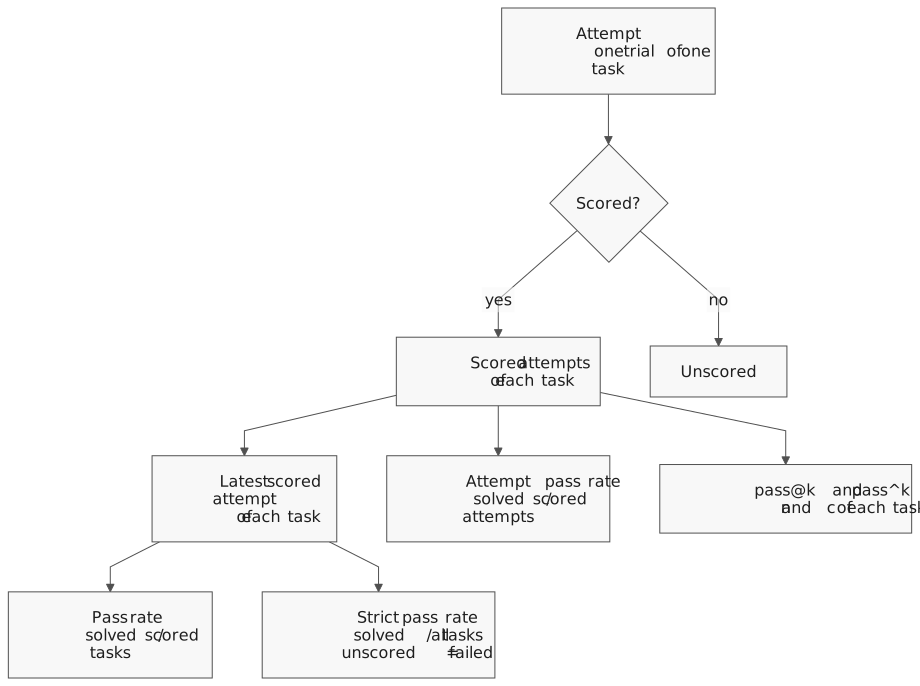
An attempt is scored when Harbor verified it and the agent did real work:
- The trajectory names the model that you pinned for the round.
- The model gave output tokens. An attempt where the provider refused every call measures the runner, not the agent.
- An attempt that reached the agent time limit is scored, also without a trajectory.
Each task counts once, by its latest scored attempt. A task without a scored attempt is in
unscored_model_tasks.
Scores and intervals
The report gives three pass rates:
| Rate | What it counts |
|---|---|
| Pass rate | Solved tasks out of scored tasks, by the latest attempt of each task. |
| Strict pass rate | Solved tasks out of all dataset tasks. An unscored, unattempted or GPU task counts as failed. |
| Attempt pass rate | Solved attempts out of all scored attempts. The attempts of one task form one cluster. |
Each rate has a 95% interval. A small round has a wide interval. The report also gives
detectable_change_points. A second round of the same size, on other tasks, detects a rise or a
fall of this size with about 80% power. A smaller change can stay hidden. A comparison on the
same tasks needs a smaller change, see Plan the number of tasks.
The attempts of one task are not independent, so the attempt interval uses clustered standard errors. More attempts make each task result less noisy. They do not replace more tasks.
Repeated attempts
When each task has more than one attempt, the report gives two rates for each k from 1 to the number of attempts:
| Rate | The question that it answers |
|---|---|
| pass@k | Does the agent solve the task in at least one of k attempts? |
| pass^k | Does the agent solve the task in all k attempts? |
Vis estimates both from all attempts of a task, not only from the first k. A task with n attempts and c solved attempts gives these values. The report shows the mean over the tasks.
pass@k = 1 - C(n - c, k) / C(n, k)
pass^k = C(c, k) / C(n, k)
C(n, k) is the number of ways to choose k attempts from n. For example, a task that solved 2
of 4 attempts has pass@2 = 1 - 1/6 = 83% and pass^2 = 1/6 = 17%.
- At k = 1, both rates are c / n.
- pass@k goes up with k, and pass^k goes down. A large gap shows an agent that is not consistent.
- Use pass@k when one success is enough, for example when a person picks the best result.
- Use pass^k when each run must succeed, for example in an automation.
unstable_tasks lists the tasks with both solved and failed attempts. Read them first.
Cost values use metered API prices. They are not subscription charges.
Failure causes
The diagnosis sorts the failed tasks by cause, with the largest cause first. Each attempt gets one outcome, then one cause:
| Cause | When it applies |
|---|---|
dead_tools |
The attempt repeated one error until its end, for example a lost sandbox. |
agent_errors |
Harbor reported an exception, or the trajectory ended with an error. The outcome is agent_error:<type>. |
agent_timeouts |
The attempt reached the agent time limit. |
early_stops |
The agent finished by itself and failed the tests, after at most 25% of its time limit. |
unscored |
The attempt ended without a verifier result. |
other |
The agent used its time and failed the tests. |
The diagnosis also lists near misses. A near miss is a failed task that passed at least 80% of its verifier tests. Rewards are all or nothing, so a near miss scores zero. Read its trajectory first.
Check the causes with labels
The causes come from rules, and a rule can be wrong. To check them, a person reads failed attempts
and gives each one a cause, a label. Save the labels with
save_label, or write labels.json in the job folder:
{
  "add-function__AbC123": {"cause": "early_stops"},
  "add-function__XyZ789": {"cause": "other"}
}
Vis then compares the labels with the automatic causes. It gives two measures that correct for agreement by chance:
- Cohen's kappa compares two raters, here the rules and the person.
- Krippendorff's alpha also accepts more than two raters and missing values.
| Labels and kappa | What it means |
|---|---|
| Fewer than 30 labels | The kappa is not stable yet. Label more failed attempts. |
| Kappa below 0.6 | Do not trust the automatic causes. Correct the rules first. |
| Kappa from 0.6 to 0.8 | Use the causes with a review. Read the disagreements first. |
| Kappa 0.8 or more | You can use the causes without a review. |
Only a person can add a label. Label the attempts without reading the automatic cause first, or the cause suggests the label.
Check a judge
A judge is a model that reads trajectories. It sorts each failed trial into a stage:
understand, write, verify or other. Run it with three samples for each trial:
python -m blockether.vis.evals.judge jobs/first --provider P --model M --samples 3
The judge writes judge_stages.json in a new job folder under jobs/vis-judge/. Give that folder
to the report:
python -m blockether.vis.evals.report jobs/first --judge jobs/vis-judge/judge-20260102-000000
The report then gives two checks:
- The sample agreement is the share of trials where all samples give the same stage. Its alpha corrects it for chance. Correct the rubric of a judge that disagrees with itself before you compare it with people.
- The stage labels compare the judge with a person. Save them in
stage-labels.jsonin the judge folder withsave_stage_label, or write the file, for example{"add-function__AbC123": {"stage": "write"}}.
| Krippendorff's alpha | What it means |
|---|---|
| Below 0.667 | The samples disagree too much. Make the rubric clearer before you use them. |
| From 0.667 to 0.8 | Use the results only for tentative conclusions. Read the trials where the samples differ. |
| 0.8 or more | You can use the stages of the judge. |
Compare two runs
A comparison pairs the cases that both runs scored. A case is one task with one agent and one model. The comparison gives the difference in points with a 95% interval and a verdict:
betterorworsewhen the interval excludes zero.no measurable differencein all other cases.
A result without a clear change can mean two things. The runs can be the same, or the round can
be too small to show a change. To tell them apart, give margin_points, the smallest change that
matters to you. The verdict then compares the interval with the margin:
| Verdict | The 95% interval | What it means |
|---|---|---|
better |
Is above zero. | The candidate is better. |
worse |
Is below zero. | The candidate is worse. |
equivalent |
Is inside the margin on both sides. | No change that matters exists in either direction. |
not worse |
Starts above the negative margin. | The candidate loses less than the margin. It can be better. |
not better |
Ends below the margin and reaches the negative margin. | The candidate gains less than the margin. It can be worse. |
inconclusive |
Reaches both sides of the margin. | The round is too small for a decision. |
The margin must be above 0 and at most 100. For no margin, leave out margin_points. The verdict
uses the 95% two-sided interval before rounding. A classic equivalence test (TOST) uses a 90%
interval. The 95% interval is wider, so equivalent and not worse need about 27% more cases.
A better or worse verdict does not depend on the margin. When the change is, or can be,
smaller than the margin, a caveat says so:
| Verdict | The 95% interval | Caveat |
|---|---|---|
better |
Ends below the margin. | The gain is real, but smaller than the margin. |
better |
Starts below the margin. | The gain is real, but it can be smaller than the margin. |
worse |
Starts above the negative margin. | The loss is real, but smaller than the margin. |
worse |
Ends above the negative margin. | The loss is real, but it can be smaller than the margin. |
The comparison also gives an exact McNemar test for each route, and lists the cases that became
better or worse. The interval decides the verdict. The exact test is stricter. When the verdict is
better or worse and the exact test gives p = 0.05 or more, a caveat says so. Treat that
verdict as likely, not as proved, and add cases.
When the two runs share no case but each run used one route, Vis pairs the cases by task. A caveat then names the parts that differ: the agent, the model or both. When both differ, you cannot tell which part made the difference.
Leaderboard position
Vis reads a public board from Harbor Hub, for example Terminal-Bench 4.0.0. It places your round on the board by its pass rate and its strict pass rate, each with a range of possible ranks. The position also lists caveats, for example when the board rows ran more trials for each task.
Decide from the results
A round gives many numbers, and each number answers a different question. This section tells you which number to use, when to ignore a number and how to decide on a change.
Choose the number for your question
| Your question | Use | Do not use |
|---|---|---|
| How good is the agent on these tasks? | The pass rate and its 95% interval. | The rate without its interval. |
| How good is it on the full benchmark? | The strict pass rate. | The pass rate. It leaves out the unscored tasks. |
| Is the agent consistent? | pass^k and unstable_tasks. |
pass@k. A second attempt hides the first failure. |
| Can a person pick the best of k results? | pass@k. | pass^k. |
| Must each run of an automation succeed? | pass^k. | pass@k. |
| Did my change help? | The verdict of a paired comparison on the same tasks. | Two separate pass rates. Their intervals can overlap when a paired comparison shows a change. |
| Is the change worth its cost? | The verdict with margin_points, and the total cost of both rounds on the paired tasks. |
The verdict alone, or the cost for each solved task. |
| Where must I improve the agent? | The largest failure cause, the near misses and the unstable tasks. | One failed trial. |
| Are the failure causes correct? | Cohen's kappa over at least 30 labels. | The causes without labels. |
| Is a judge reliable? | Krippendorff's alpha of its samples, then of its stage labels. | One judge sample. |
| Where does the agent rank on a public board? | The leaderboard position with its rank range. | One rank. |
Ignore a number in these cases
- The interval is wider than the change that you look for. A round of 16 tasks cannot show a 10-point change. Add tasks first.
- A caveat says that the agents and the models differ. You cannot tell which part made the difference. Change one part at a time. A caveat that names one part points to that part only when all other settings are the same.
- A caveat says that the exact test does not confirm the verdict. Treat the verdict as likely, and run more cases before you depend on it.
- Cases ran on one side only. The comparison leaves them out. Make sure that they are not the hard tasks.
- Many tasks are unscored. The pass rate then counts fewer tasks than you think. Use the strict pass rate, and find why the attempts were not scored.
- The kappa is below 0.6, or fewer than 30 labels exist. Do not choose a fix from the failure causes.
- You changed the agent while you read the failures of the same tasks. The tasks then measure your fixes, not the agent. Confirm the change on tasks that you did not read.
- You compared many candidates and kept the best one. By chance, about 1 of 20 candidates without a real change passes the 5% level. Run the best candidate again on new tasks.
- The two rounds used a different checkout, model version or task version. Pin these before both rounds.
- You compare cost with a subscription. The cost uses metered API prices.
Decide on a change
Choose the margin before the rounds run, not after you see the result. Use the smallest change in points that changes your decision, for example 5 points. Then find the verdict and the cost of the candidate in this table:
| Verdict | The candidate costs less | It costs the same | It costs more |
|---|---|---|---|
better |
Adopt it. | Adopt it. | Adopt it when the gain is worth the cost. |
better, and the gain can be smaller than the margin |
Adopt it. | Adopt it. | Adopt it when the low end of the interval is worth the cost. Else add cases. |
better, and the gain is smaller than the margin |
Adopt it. | Adopt it when it has other benefits. | Keep the baseline. |
equivalent |
Adopt it. | Keep either. Prefer the simpler one. | Keep the baseline. |
not worse |
Adopt it. | Adopt it when it has other benefits. | Add cases. |
not better |
Adopt it only when you accept a loss down to the low end of the interval. | Keep the baseline. | Keep the baseline. |
inconclusive or no measurable difference |
Add cases. | Add cases. | Add cases. |
worse, and the loss can be smaller than the margin |
Add cases. | Keep the baseline. | Keep the baseline. |
worse, and the loss is smaller than the margin |
Adopt it only when you accept that loss. | Keep the baseline. | Keep the baseline. |
worse |
Keep the baseline. | Keep the baseline. | Keep the baseline. |
To add cases, run more tasks on both sides. Plan the number of tasks
shows how many you need. Before you adopt a better verdict that the exact test does not
confirm, run the candidate again on new tasks.
Compare the total cost of both rounds on the paired tasks. Do not use the cost for each solved task. A candidate that solves more tasks gets a lower cost for each solved task, also when it costs more in total.
Plan the number of tasks
Choose the number of tasks before the rounds, from the smallest change that you want to see. The table gives the change in points that shows with about 80% power, with one attempt for each task:
| Tasks | Same tasks, 20% of results change | Same tasks, 40% of results change | Other tasks, at a 50% pass rate |
|---|---|---|---|
| 12 | 34.7 | 48.7 | 47.9 |
| 20 | 28.5 | 38.2 | 39.6 |
| 30 | 23.2 | 31.6 | 33.5 |
| 50 | 17.9 | 24.7 | 26.7 |
| 100 | 12.6 | 17.6 | 19.4 |
| 200 | 8.9 | 12.5 | 13.9 |
| 400 | 6.3 | 8.8 | 9.9 |
The share of results that change is the share of tasks with a different result in the two
rounds. A small, targeted change moves few tasks, so the first column applies. In a comparison,
detectable_change_points gives this value for your own cases. With 12 tasks, whole tasks cannot
give 20% and 40%. That row uses 2 and 5 changed tasks.
- More attempts for each task make the change smaller. With 30 tasks, 3 attempts show about 20 points, and 1 attempt about 30 points.
- A 5-point change needs about 170 tasks when 5% of results change. It needs about 320 tasks at 10% and 630 tasks at 20%.
- With a small task set, look only for large changes. Or use
margin_pointsto show that a cheaper change does no harm.
How Vis checks these statistics
Vis tests each statistic against published reference values. It also tests the claims of this
page, with exact sums over the binomial distribution or with seeded simulations. The tests are
in packages/vis-agent/tests/test_evals_stats.py and test_evals_compare.py.
| Claim | Measured result |
|---|---|
| A 95% Wilson interval covers the true pass rate 95% of the time. | The mean coverage is 94.6% to 95.4% for 10, 30 and 100 runs. For true rates from 5% to 95%, it is never below 89%. Near 0% or 100%, it can fall to about 84%. |
| The cluster interval stays correct with repeated attempts. | 93% to 96% for 16 to 100 tasks with 2 to 5 attempts. A Wilson interval over all attempts covers only 70% to 89%. |
Without a true change, a comparison rarely gives better or worse. |
5% to 7% of comparisons for 12 to 80 tasks with one attempt. About 3% with 3 attempts. |
| The exact McNemar test gives a false alarm at most 5% of the time. | At most 5.0% for 1 to 80 changed cases, and 2% to 5% for 68 of them. It is strict, so it misses some real changes. |
A true change of detectable_change_points shows with about 80% power. |
83% in a comparison of 40 tasks. In the report, 80% to 83% for a rise and for a fall. |
| pass@k and pass^k have no bias. | Their mean over all possible results is equal to the true value. |
A candidate that is worse by the margin is rarely not worse. |
2% to 4% of comparisons with 60 and 200 tasks. |
| Benjamini-Hochberg q-values control the false discoveries. | 8% false discoveries at q ≤ 0.1. |
detectable_change_points uses a normal approximation. The report check sums the exact binomial
distribution of a two-proportion z-test. It shows where the approximation gives less power.
These checks found one error, which is now corrected. The report used the smaller change of a
rise and a fall as detectable_change_points. At a pass rate of 75%, a fall of that size showed
with only 58% power. The report now gives the larger change.
The failure causes, the near-miss limit and the judge rubric are rules, not statistics. No simulation proves them. Check them on your own tasks with labels.
Example: decide on 12 tasks
Two agents, pi and codex, ran the same 12 tasks with the same model. pi solved 3 tasks and codex
solved 8. The rounds cost 2.82 USD and 5.46 USD. A comparison with margin_points=10 returns
these fields:
| Field | Value |
|---|---|
baseline_rate_percent |
25.0 |
candidate_rate_percent |
66.7 |
difference_ci95 |
7.0 to 64.5 |
verdict |
better |
p_value |
0.0625 |
detectable_change_points |
41.1 |
It also returns three caveats:
- The sides used different agents, pi and codex, with the same model gpt-6.1-sol.
- The interval says better, but the exact test gives p = 0.062. Confirm the change with more cases.
- The gain is real, but it can be smaller than the margin of 10 points.
- Only the agent differs as a route part. Other settings, such as the output budget, were not identical. So the result points to the agent setup, not to the agent alone.
- The interval excludes zero, so the verdict is
better. The exact test does not confirm it. - The gain can be as small as 7 points, which is below the margin.
- codex costs 1.9 times more on the same tasks. The table says to adopt it only when a 7-point gain is worth 2.64 USD more for each 12 tasks.
- The exact test does not confirm the verdict, and only a change of 41 points or more shows reliably on 12 tasks. Run a second, larger round before you adopt codex.
Improve an agent with evaluations
You, or an agent that reads this page, can improve Vis in a loop. Each loop tests one change. These steps keep the result honest:
- Freeze the code. Run from a copy of one commit, for example a
git archiveexport. A shared checkout can change while the rounds run. - Split the tasks. Read failures only in a development set. Keep a held-out set that you never read. Size it with Plan the number of tasks, so that the margin can show.
- Run the baseline. Run the development set with a pinned model and the same limits for each task. Report the round.
- Find the largest cause. Read the failure causes, the near misses and
unstable_tasks. Check the causes with labels before you trust them. Without labels, treat each cause as a hypothesis, not as a fact. - Make one change. Change one prompt rule, tool or default. Write down the expected effect and the margin before you run. Choose the margin from your decision, not from the task count. When the margin is smaller than the change that your task count can show in Plan the number of tasks, add tasks first.
- Run the candidate. Use the same tasks, model, attempts and limits as the baseline.
- Compare with the margin. Use
compare_casesor the comparison API. Choose the action from the decision table. A kept change becomes the new baseline. - Repeat steps 4 to 7 until the stop rule ends the loop. A rejected change is a normal result. Record it and try the next cause.
- Confirm on the held-out set once. Run the first baseline and the final candidate on the
held-out tasks. The result agrees when the verdict is
better. A change that only needs to do no harm, such as a cheaper default, also agrees atnot worse. Keep the changes only when the result agrees. - Record the result. Keep the round names, the commit, the verdict, the interval and the cost. Record a rejected change too.
After step 9, the held-out set is no longer unseen. Make a new held-out set for the next loop.
Set a stop rule before the first loop. For example, stop after five changes, or after three
changes in a row without a better verdict. One worse verdict is not a reason to stop. Do not
run the same comparison again until it gives better. Each new run is another chance of a false
verdict.
References
- Anthropic, Demystifying evals for AI agents: task design, pass@k and pass^k, isolated trials and judge calibration.
- Anthropic, Define success criteria and build evaluations: automatic grading and rubrics for model judges.
- Evan Miller, Adding error bars to evals (arXiv:2411.00640): intervals, clustered errors, paired comparisons and power.
- Donald Schuirmann, Journal of Pharmacokinetics and Biopharmaceutics 15, 1987: the two one-sided tests for equivalence and non-inferiority margins.
- Alan Agresti and Yongyi Min, "Simple improved confidence intervals for comparing matched proportions", Statistics in Medicine 24, 2005: the paired interval.
- Mark Chen and others, Evaluating large language models trained on code, 2021: the unbiased pass@k estimator.
- Shunyu Yao and others, τ-bench, 2024: the pass^k metric.
- Philippe Laban and others, LLMs get lost in multi-turn conversation, 2025: the Lost in Conversation benchmark.
- Di Wu and others, LongMemEval: Benchmarking chat assistants on long-term interactive memory, 2025: the LongMemEval benchmark.
- Kiran Vodrahalli and others, Michelangelo: Long context evaluations beyond haystacks, 2024: the MRCR task.
- Jacob Cohen, "A coefficient of agreement for nominal scales", Educational and Psychological Measurement 20, 1960: Cohen's kappa.
- Klaus Krippendorff, Computing Krippendorff's alpha-reliability, 2011: the alpha and its limits 0.667 and 0.8.
See also
- Evaluations API — write, run, score, diagnose and compare from Python or HTTP.
- Python SDK — install the SDK and read one run with its trajectory.
- Sessions — follow one task while it runs.
- Harbor documentation — tasks, jobs, verifiers and the ATIF trajectory format.
