Extension design
A useful extension gives Vis a clear way to do a job that your project needs. For example, it runs the right tests, inspects a service or checks a result. This guide gives best practices to choose an operation, explain its inputs and test it. Start with the one-file tutorial. When you need a larger example, use the tested greeter package.
When to use
- The agent repeats the same sequence of calls to get one answer. Choose a tool boundary that returns that answer directly.
- The agent calls your tool with the wrong arguments or misreads its result. Describe its structure once and document default behavior.
- The extension is growing and needs tests. Keep the entrypoint small and test both boundaries.
- People cannot quickly see what a tool did. Design its Activity, as in the CI report.
- A team rule should be measured after every edit, not left to a reminder. Build an edit–check–fix cycle.
- Other Python programs need the same tool descriptions and help. Use a typed catalog.
Follow the greeter example from its contract through registration, Activity and tests. Then try the CI report and edit–check–fix cycle. The optional catalog example comes last.
Choose a useful tool boundary
Choose an operation with a clear result. Then the agent does not have to rebuild the same sequence for every call. Return Python values that callers can use directly. Do not return CLI output or JSON text that callers must parse. A string is enough for a text result. A frozen dataclass helps when several fields have different meanings.
Keep reads separate from mutations. Tag each tool by what it does:
- Mark state-changing tools with
tag="mutation", or@vis.method(tag="mutation")on a namespace method. - Mark tools that check work, such as tests and lint, with
tag="verification". - Mark tools that reach people or systems outside the session with
tag="external".
Vis uses the tag to summarize a finished turn. See Report checks and outside effects. The tag describes the operation. It does not grant permission or enforce a policy.
Validate domain constraints in the implementation. When they fail, raise a useful exception. Type annotations describe the API. They do not validate calls.
Describe structure once
The registered callable signature and resolved types are the source of truth for the call shape.
This includes parameter names and kinds, required or default status, and result structure. When you
need those details, inspect the narrow doc("tool.name") page, its .contract, or a ToolSpec
from Catalog.spec(). Do not rely on a signature written by hand in prose.
Keep docstrings short and semantic. Vis combines them with the registered metadata
to build doc(). You do not need to repeat signatures, default declarations or
complete return schemas. Every public callable still needs a nonblank docstring.
Its first line supplies the short apropos() preview, so begin with what the tool
does. Search matches tool names, not that preview: choose predictable names.
Document what the signature and types cannot explain:
- When to call the tool and what must already be true.
- Units, limits, contextual defaults and the meaning of empty or missing results.
- Side effects, safety constraints and external services the call uses.
- Failure conditions and whether retrying is safe.
Use Annotated[T, "meaning"] for parameter and result-field descriptions. Keep
preconditions, side effects and failure conditions in the docstring. Do not copy
the signature into prose or maintain a second schema. Keep result classes at
module level so Vis can resolve their names safely. Vis loads the extension file
itself as if it began with from __future__ import annotations. Package and helper
modules that define tools need that import themselves.
The packaged example's src/vis_greeter/__init__.py is ordinary Python with no Vis dependency:
"""Ordinary Python code, usable and testable without a Vis session."""

from __future__ import annotations

from dataclasses import dataclass
from typing import Annotated


@dataclass(frozen=True)
class Greeting:
    """The generated greeting, without any external side effects."""

    text: Annotated[str, "Greeting text, ready to display."]
    characters: Annotated[int, "Number of Unicode code points in text, not bytes."]


class Greeter:
    def hello(
        self,
        name: Annotated[str, "Nonblank name of the recipient."],
        *,
        uppercase: bool = False,
    ) -> Greeting:
        """Greet one person. Requires a nonblank name; raises ValueError otherwise.

        Preserves capitalization unless uppercase is requested.
        Does not send a message or modify stored state.
        """
        if not name.strip():
            raise ValueError("name must not be blank")
        text = f"Hello, {name.strip()}!"
        if uppercase:
            text = text.upper()
        return Greeting(text, len(text))
Document default behavior
Explain omitted-argument behavior when it matters to the caller, without maintaining a second list of default declarations. The greeter says that it preserves capitalization unless uppercase is requested. Its signature already declares the optional flag. Test omission and an explicit override so this meaning stays accurate.
For contextual defaults, name the resolution rule: for example, “Omitting repo
uses the current project's repository.” For None, say whether it means automatic
selection, no limit, or absence. Avoid vague phrases such as “uses the default.”
Vis exposes ordinary literal defaults in signatures and generated help, so you do not need to copy
their values into prose. Instead, explain what a timeout controls and its units, or what an empty
collection means. Opaque objects and defaults outside the inspection budget appear as .... Omit
such an argument to use the original default, not Ellipsis.
Custom repr() methods and factories never run during inspection. Declared defaults are public
metadata, so resolve credentials inside the tool. Do not put them in parameter defaults. See the
contract reference.
Keep the entrypoint small
For reusable code, keep business logic in an importable package and registration
in extension.py. A CLI, if useful, is another caller of the same functions.
Do not import the entrypoint from domain code, change sys.path, or start login,
network requests or background work during registration.
The packaged example connects the implementation to Vis with this entire entrypoint:
"""Vis entrypoint. The business logic lives in vis_greeter, not in this file."""

import blockether.vis.extension as vis
from vis_greeter import Greeter


def greeting_activity(*, phase, result, **_):
    """Show the greeting and its character count, not the result object's repr."""
    if phase != "success":
        return None
    return vis.ActivityPresentation(
        "Greet person",
        f"{result.characters} characters",
        (vis.ActivityText(result.text[:1000]),),
    )


Greeter.hello = vis.method(
    activity=vis.Activity(
        label="Greet person", show_start=False, render=greeting_activity
    )
)(Greeter.hello)

vis.register_extension(
    vis.Extension(
        name="vis-greeter",
        description="Typed greeting tools and an optional greeting procedure.",
        alias="greet",
        symbols=[vis.Symbol(Greeter(), name="greet")],
    )
)
Symbol(Greeter(), name="greet") exports greet.hello(...). The public namespace
comes from Symbol.name, not Extension.alias. Declare import roots in the
package manifest, or use an
editable project. Do not combine both import strategies
for the same source.
Design the activity with the tool
Every registered callable owns its Activity presentation, including every public
method in an object namespace. Declare it at the binding, not as a later UI task.
The example decorates Greeter.hello in the entrypoint so its ordinary Python
implementation stays independent of Vis.
Someone who reads an Activity should understand what happened without knowing Python method names or result types. Use sentence-case English labels such as "Greet person" or "Run tests". Keep proper names and acronyms. Use consistent terms, without profanity or vulgarity. Show a meaningful target, count or outcome in the summary. Put selected evidence behind disclosure instead of serializing the returned object.
Never change the case of code, paths or returned content only to format a label.
Choose whether a person needs to see the operation begin. Fast local reads,
patches and greetings use show_start=False: only the end result is visible.
The example uses this policy because generating a greeting is immediate. Slow
work, network requests and user input keep show_start=True and can publish
meaningful intermediate updates. The engine always tracks start/end internally.
Hiding progress never hides failures, cancellation or the final result.
Test empty results, the chosen start visibility, success, failure and cancellation. Verify that presentation errors cannot change the tool result. The engine supplies execution state and errors, but no generic result view. Follow the canonical Activity API for declarations and limits.
Give each kind of instruction one owner
| Information | Owner |
|---|---|
| Parameter names, kinds, required/default status and result structure | The registered signature and resolved types |
| Preconditions, units, meaningful default behavior, side effects and failures | Annotated descriptions and a short docstring |
| When to use this extension and where to discover its tools | A short extension prompt |
| A multi-step procedure spanning tools | A skill with a clear trigger in its description |
| Project-wide rules | Project instructions, not every tool's prompt |
Link from a skill to doc("greet.hello") instead of copying the API reference.
Keep references and templates beside SKILL.md and read them when needed.
Installing or reading a skill never executes its procedure or supplies authorization.
See prompts and discovery and
bundled skills.
Test both boundaries
Test the Python implementation
From a development environment containing the SDK and pytest, run the example's
tests from the copied greeter/ directory:
python -m pip install vis-agent pytest
python -m pytest tests
Cover the normal result, omitted arguments, explicit overrides, invalid input and side effects. The example's tests run without a gateway. Use your project's own test environment. Installing the SDK there does not install an extension into Vis.
Outside the engine, vis.state, vis.log and vis.shell use a local host, and
vis.ask prompts in the terminal. Supply answers with
vis.outside.answer_with({...}) or VIS_OUTSIDE_ANSWERS JSON. Set
VIS_OUTSIDE_NONINTERACTIVE=1 to make input requests undeliverable. Session-only
operations cannot be proved by an outside test. For views, use the existing
LiveRecorder.
Test the registered tool
- Install the local package, then start
Vis in the target project or run
/reload. - On the next turn, inspect
apropos(r"^greet\."),doc("greet.hello")andgreet.hello.contract. Confirm the inputs, public default behavior and result fields. - Call
await greet.hello("Ada")andawait greet.hello("Ada", uppercase=True). Check the returned.text, not only registration or the extension list. - After an edit, reload and repeat a call. Vis can keep the last working version and mark it stale. In that case, fix the load failure and repeat the call with the updated code.
The repository's regression suite executes the documented package and loads it
through the real host, including discovery, sandbox results, skill reload and
removal. Your integration also needs a representative call against its own
required dependencies. For tests in Vis's shared environment, use
vis-agent python -m pytest, not vis-agent python pytest.
Show a CI report without hiding failures
Use a custom Activity when a raw return value would leave the reader to work out what happened. This example reads an existing local test summary. It does not run tests, contact a CI service or check whether the report is current.
After installing the reader, ask Vis:
Read the CI report at
/workspace/ci-report.jsonand show the passed and failed counts.
The Activity says Read CI report, summarizes 42 passed · 1 failed and
includes the source path as expandable evidence. The agent still receives a
frozen CIReport with all three fields. Reading a report with failing tests is a
successful read, not a claim that the tests passed.
With both counts at zero, the summary is No tests reported. Missing files, invalid JSON and invalid counts fail the call. The Activity keeps the error type and message, with a labeled excerpt for long messages. The engine owns the operation's state, timing and error, independently of this presentation.
Install the report reader
Prepare a UTF-8 JSON file with this shape. Adapt your CI job's output to it if needed. Counts must be nonnegative integers, not booleans. Extra fields are ignored.
{"passed": 42, "failed": 1}
Save the following as .vis/extensions/ci_report.py, then
reload extensions. Only load code you trust:
extensions run in host CPython, not in the agent's sandbox.
# ci_report.py
from __future__ import annotations

import json
from dataclasses import dataclass
from pathlib import Path
from typing import Annotated

import blockether.vis.extension as vis


@dataclass(frozen=True)
class CIReport:
    """Counts from a local report, not evidence of a new test run."""

    path: Annotated[str, "Absolute path of the report that was read."]
    passed: Annotated[int, "Number of passing tests in the report."]
    failed: Annotated[int, "Number of failing tests in the report."]


def read_ci_report(
    path: Annotated[str, "Absolute path to a UTF-8 JSON test summary."],
) -> CIReport:
    """Read a local CI summary without running tests or contacting a service.

    The file must contain a JSON object with nonnegative integer passed and
    failed counts. Zero counts mean no tests were reported, not a passing suite.
    Extra fields are ignored. Relative paths and invalid counts raise ValueError;
    file, encoding and JSON errors propagate. Does not modify the file.
    """
    file = Path(path)
    if not file.is_absolute():
        raise ValueError("path must be absolute")
    data = json.loads(file.read_text(encoding="utf-8"))
    if not isinstance(data, dict):
        raise ValueError("report must be a JSON object")
    for name in ("passed", "failed"):
        value = data.get(name)
        if type(value) is not int or value < 0:
            raise ValueError(f"{name} must be a nonnegative integer")
    return CIReport(str(file), data["passed"], data["failed"])


def present_report(*, phase, result=None, error=None, **_):
    if phase == "start":
        return vis.ActivityPresentation(
            headline="Read CI report", summary="Reading local test results"
        )
    if phase == "failure":
        detail = f"{type(error).__name__}: {error}"
        if len(detail) > 1000:
            detail = detail[:1000] + "\n[Error excerpt]"
        return vis.ActivityPresentation(
            headline="Read CI report",
            summary="Could not read test results",
            content=(vis.ActivityText(detail),),
        )
    summary = (
        f"{result.passed} passed · {result.failed} failed"
        if result.passed or result.failed
        else "No tests reported"
    )
    return vis.ActivityPresentation(
        headline="Read CI report",
        summary=summary,
        content=(vis.ActivityText(f"Source: {result.path}"),),
    )


vis.register_extension(
    vis.Extension(
        name="ci-report-example",
        description="Read local CI summaries with a human-readable Activity.",
        alias="ci",
        symbols=[
            vis.Symbol(
                read_ci_report,
                activity=vis.Activity(
                    label="Read CI report", show_start=False, render=present_report
                ),
            )
        ],
    )
)
Call the report reader
The agent can discover read_ci_report and call it directly. For a file at
/workspace/ci-report.json, the call is:
report = read_ci_report("/workspace/ci-report.json")
print(report)
This quick local read uses show_start=False, so it does not display a running row. The callback
also handles start. If you adapt the tool to do slow work, use show_start=True so people can see
it begin. Before you publish the adapted tool, test its running, success, failure and empty states.
Check code complexity after edits
Suppose your team wants Python code to stay easy to follow. A skill can remind the agent to check complexity, but a reminder is not a measurement. Put the check in an extension hook, so it runs at the edit boundary. Then give the agent the findings on its next turn. You decide which metric, threshold and source files matter to your project.
This example measures control-flow nesting, not cyclomatic complexity. It
reports the deepest chain of if, loops, try, with and match statements in
each Python file. A new function, class or lambda starts at depth zero. elif
counts as another nested if in Python's syntax tree. Comprehensions and boolean
expressions do not add depth. The limit of three is an example policy, not a
universal definition of good code.
See the edit–check–fix cycle
After installing the check, ask Vis:
Update the order-processing code. Show the nesting check, simplify any reported nesting, then show the check again. Run the normal tests before finishing.
- Edit. The hook scans
src/**/*.pyat the edit boundaries and supplies findings to the agent on its next request. - Check. The agent calls
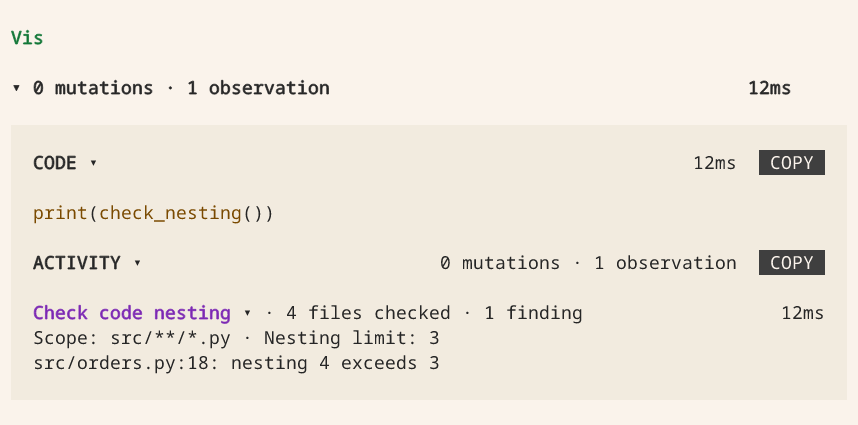
check_nesting()to scan the current files and show you a Check code nesting Activity. Expand it to see the scope, limit and file-and-line findings. - Fix and repeat. After simplifying the code, the agent calls the check again. The new Activity shows the new result. The earlier finding remains in history.
The hook supplies automatic feedback, but does not create its own Activity or
force the agent to fix anything. The registered tool provides the visible check.
It runs a fresh scan, so you can also ask for it before making an edit. This quick
local check uses show_start=False: you see the result, not a running row.
Select either image to view it full size.
Before the fix: four files checked, with one location above the nesting limit.
After the fix: the same four files checked, with no nesting findings.
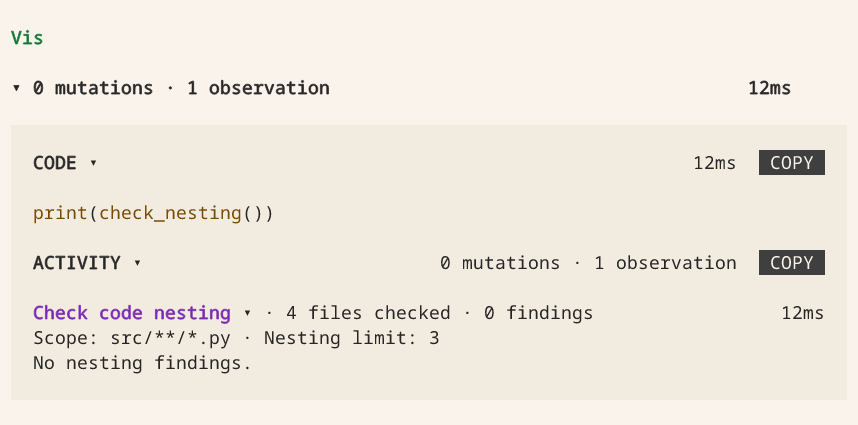
A successful Activity means the scan returned a report, not that every file passed. Findings include parse and read errors. No Python files found is a separate empty state, not a passing check.
Know what this checks
patchruns the check after a patch operation. Apython_executionhook also runs when the whole Python block returns, including a normal Python error after a write. That coversPath.write_text()andwith open(..., "w")too. A block that callspatchcan therefore scan more than once. The report is replaced, not accumulated.- Writes are checked at these boundaries, not at every filesystem write. Unfinished background processes, a killed interpreter and edits made outside Vis are not continuously watched. Wait for any work you start before relying on the report, and run your normal checks before accepting changes.
- This is feedback, not a rollback or a security boundary. An after hook cannot
undo an edit or refuse it after the fact. For a hard rule, validate inside the
domain operation or use a
beforehook withvis.block(reason)on the operation you want to refuse. Keep access controls in the sandbox policy and repeat acceptance checks in CI. Ordinary tool-hook errors are logged and do not block the operation.
Install the check
For a small Python project with a src/ directory, save this complete file as
.vis/extensions/code_quality.py, then use /reload. It needs Python 3.11 or
later, the SDK supplied by Vis and no other packages. Like every extension, it
runs as trusted host code: review it before loading it. Keep src/ limited to
code you intend to scan, including any linked files.
# code_quality.py
import ast
from pathlib import Path

import blockether.vis.extension as vis

PROJECT = Path(__file__).resolve().parents[2]
SOURCE = PROJECT / "src"
LIMIT = 3
REPORT_KEY = f"nesting:{PROJECT}"
SCOPES = (ast.FunctionDef, ast.AsyncFunctionDef, ast.ClassDef, ast.Lambda)
BRANCHES = (
    ast.If,
    ast.For,
    ast.AsyncFor,
    ast.While,
    ast.Try,
    ast.TryStar,
    ast.With,
    ast.AsyncWith,
    ast.Match,
)


def deepest(node, depth=0):
    """Return the greatest control-flow depth and its first source line."""
    if isinstance(node, SCOPES):
        depth = 0
    if isinstance(node, BRANCHES):
        depth += 1
    best = (depth, getattr(node, "lineno", 1))
    for child in ast.iter_child_nodes(node):
        candidate = deepest(child, depth)
        if candidate[0] > best[0]:
            best = candidate
    return best


def scan():
    findings = []
    checked = 0
    try:
        if not SOURCE.is_dir():
            raise OSError("Expected a readable src/ directory.")
        for path in sorted(SOURCE.rglob("*.py")):
            label = str(path.relative_to(PROJECT))
            try:
                depth, line = deepest(ast.parse(path.read_bytes(), filename=label))
            except (OSError, SyntaxError, ValueError, RecursionError) as error:
                findings.append(f"{label}: could not check: {error}")
                continue
            checked += 1
            if depth > LIMIT:
                findings.append(f"{label}:{line}: nesting {depth} exceeds {LIMIT}")
    except OSError as error:
        findings.append(f"Could not scan src/: {error}")
    return {"checked": checked, "limit": LIMIT, "findings": findings}


def check_nesting() -> dict:
    """Scan this project's src/**/*.py and return checked, limit and findings.

    Uses the nesting metric and limit defined in this extension. Parse and read
    errors are findings; zero checked files is not evidence of a passing check.
    Stores the fresh report for the next model request. Does not modify source
    files, run tests or guarantee overall code quality.
    """
    report = scan()
    vis.state[REPORT_KEY] = report
    return report


def present_nesting(*, phase, result=None, error=None, **_):
    headline = "Check code nesting"
    if phase == "start":
        return vis.ActivityPresentation(headline, "Scanning src/**/*.py")
    if phase == "failure":
        detail = f"{type(error).__name__}: {error}"
        if len(detail) > 1000:
            detail = detail[:1000] + "\n[Error excerpt]"
        return vis.ActivityPresentation(
            headline, "Could not check code nesting", (vis.ActivityText(detail),)
        )
    checked, findings = result["checked"], result["findings"]
    files = "file" if checked == 1 else "files"
    issues = "finding" if len(findings) == 1 else "findings"
    summary = f"{checked} {files} checked · {len(findings)} {issues}"
    if not checked and not findings:
        summary = "No Python files found"
    detail = "\n".join(findings) or (
        "No nesting findings." if checked else "Add Python source files under src/."
    )
    if len(detail) > 6000:
        detail = (
            detail[:6000] + "\n[Excerpt; full findings are in the returned report.]"
        )
    return vis.ActivityPresentation(
        headline,
        summary,
        (
            vis.ActivityText(f"Scope: src/**/*.py · Nesting limit: {result['limit']}"),
            vis.ActivityText(detail),
        ),
    )


def after_edit(call):
    check_nesting()


def context(env):
    return {
        "code_quality": vis.state.get(
            REPORT_KEY, {"findings": ["Nesting has not been checked yet."]}
        )
    }


vis.register_extension(
    vis.Extension(
        name="project-nesting",
        description="Report excessive Python control-flow nesting after edits.",
        alias="quality",
        symbols=[
            vis.Symbol(
                check_nesting,
                activity=vis.Activity(
                    label="Check code nesting", show_start=False, render=present_nesting
                ),
            )
        ],
        ctx=context,
        op_hooks=[vis.OpHook(["patch", "python_execution"], after_edit, phase="after")],
    )
)
The callback reads the current files, not the text of the tool call. It scans all src/**/*.py
files each time. So it includes new files, deletions and several writes in one block, and it does
not have to parse Python write commands. For a large repository, narrow the scope or move this work
into your existing analyzer.
Use the findings
The hook supplies the report on the next model request as a
session["code_quality"] contribution such as:
{
    "checked": 4,
    "limit": 3,
    "findings": ["src/orders.py:18: nesting 4 exceeds 3"],
}
The agent can show you a fresh result with the registered tool:
print(check_nesting())
The file and line tell it where to review the change. It can flatten a branch or extract a focused
function, then inspect the next report. A parse or read error is a finding, not a passing check. An
empty findings list means the scanned files passed this metric. It says nothing about tests or
overall code quality.
The SDK's vis.state stores the report per project, and ctx supplies it on the next model
request. Text returned from an after hook would not do that, because Vis ignores its return value.
The repository tests run this exact extension through the SDK and the host. They cover patching, both Python write forms, a write followed by an exception, and clearing findings after a fix. They also call the registered check. They verify its end-only Activity, findings, clear results and empty source tree. The metric has tests for scope boundaries, syntax errors and missing source directories.
Typed catalog and generated help
Use a catalog when you want structured tool descriptions and generated help for Vis and other Python callers. This optional example reuses your existing tool contracts. You do not need a catalog to register tools.
vis.Catalog(symbols) is an immutable-data adapter over the same Symbol contracts that
registration uses. It is not a second registry. It answers these calls:
spec()returns typed top-level entries.spec("counter.write")returns aToolSpec.help("counter.write")returnsHelpDocument(tool, text).
A namespace's members keep full public names, including nested capabilities. Hidden tools are
excluded. A wrong name type raises TypeError. An unknown or hidden name raises ValueError.
Discovery does not validate configuration, authenticate, create files or call the described tools.
This complete, tested entrypoint includes a read and a mutation. Both ordinary Python callers and Vis invoke the same methods. An optional CLI should call those methods too, not parse generated help. No CLI framework or inheritance is required.
# counter.py
from __future__ import annotations

from dataclasses import dataclass
from pathlib import Path
from typing import Annotated

import blockether.vis.extension as vis


@dataclass(frozen=True, slots=True)
class Count:
    """The nonnegative count stored in a caller-owned file."""

    value: Annotated[int, "Number of completed items."]


class CounterError(RuntimeError):
    """The file could not be read or written; no success result is returned."""


def present_count(*, phase, result=None, error=None, **_):
    if phase == "failure":
        return vis.ActivityPresentation("Counter", str(error))
    if phase == "start":
        return vis.ActivityPresentation("Counter", "Accessing the count file")
    return vis.ActivityPresentation("Counter", f"{result.value} completed items")


class Counter:
    @vis.method(activity=vis.Activity(label="Read counter", show_start=False, render=present_count))
    def read(self, path: Annotated[str, "Caller-owned UTF-8 count file."]) -> Count:
        """Read a count; a missing file means zero. Does not create files.

        Raises TypeError for a non-string path, ValueError for a blank path,
        and CounterError for unreadable or invalid stored data.
        """
        self._validate_path(path)
        try:
            value = int(Path(path).read_text(encoding="utf-8"))
            if value < 0:
                raise ValueError("Stored count must be nonnegative")
            return Count(value)
        except FileNotFoundError:
            return Count(0)
        except (OSError, ValueError) as error:
            raise CounterError("Cannot read count") from error

    @vis.method(tag="mutation", activity=vis.Activity(label="Write counter", show_start=False, render=present_count))
    def write(self, path: str, *, value: Annotated[int, "Nonnegative completed-item count."]) -> Count:
        """Replace the caller-owned file's count; its parent directory must exist.

        Validate before IO: wrong types raise TypeError; blank paths and negative
        counts raise ValueError. Write failures raise CounterError. No retries.
        """
        self._validate_path(path)
        if type(value) is not int:
            raise TypeError("value must be an integer")
        if value < 0:
            raise ValueError("value must be nonnegative")
        try:
            Path(path).write_text(str(value) + "\n", encoding="utf-8")
        except OSError as error:
            raise CounterError("Cannot write count") from error
        return Count(value)

    def _validate_path(self, path):
        if not isinstance(path, str):
            raise TypeError("path must be a string")
        if not path.strip():
            raise ValueError("path must not be blank")


symbols = (vis.Symbol(Counter(), name="counter"),)
catalog = vis.Catalog(symbols)
vis.register_extension(vis.Extension(
    name="counter-example", description="A counter with generated tool help.",
    alias="counter", symbols=(*symbols, vis.Symbol(catalog, name="doctor")),
))
The same callable metadata supplies structured values, generated help and Vis doc().
ParameterSpec keeps parameter kind, requiredness, has_default and default_is_none. It never
contains the actual default value. TypeSpec recursively describes result fields, containers,
literals and Annotated meaning.
Records and nested collections returned by the catalog are frozen dataclasses and tuples. When declarations change, rebuild the catalog. Lookup does not inspect mutable runtime state.
In Vis, inspect await doctor.spec("counter.write") and
await doctor.help("counter.write"), then compare doc("counter.write"). The catalog
covers the symbols passed to it. The separate doctor discovery adapter is not itself
in that snapshot. Test the same scope against the actual registered public names:
vis.testing.assert_catalog(
    catalog,
    names=["counter.read", "counter.write"],
    mutations=["counter.write"],
)
assert_catalog checks name and mutation parity, generated help and unresolved types, including
decorated methods and nested result fields. It allows explicitly opaque or Any data. It is not a
runtime type checker.
In integration tests, pass names that you got from registration or apropos(). Successful
construction is not proof. Also call registered tools, and test keyword-only binding, invalid input
before IO, operational exceptions and result immutability. The SDK suite runs the code above. The
real host verifies spec, help, doc, discovery and invocation together.
For long-running observations, use the synchronous monitoring recipe and its cancellation tests. Catalog inspection must not start its readers. The catalog regression also invokes that registered observation, cancels it and checks reader cleanup. Cancellation is never converted into a successful observation. Activity is the human presentation, not a replacement for typed result data. Serialize only at a transport edge.
See also
- Extension API — exact declarations, contracts and callback rules.
- Using an existing Python project — editable imports and dependency preparation.
- Installing and sharing extensions — the distributable package layout.
