Forms and user input
Use a form when your extension must ask the user for something. For example, the user chooses an
option, enters a password or token, or confirms a step. vis.ask shows the form in the terminal or
Companion app. It waits for an answer and returns it to your Python code.
When to use
- A tool is about to do something that needs a person's approval, such as a deployment. Ask for confirmation and stop if the person cancels.
- The tool needs a token or one-time code that must not appear in the
conversation. A
passwordorotpfield returns a handle instead of the value. Only the handle is recorded or sent to the model. - Only a person can make the choice, such as which environment to deploy to. Offer the options as fields.
- The input must be valid before the tool continues. Add validation that refuses a bad value with a message.
To show progress instead of asking a question, use a live view. A live view can also collect input while work runs.
Before you start
Call vis.ask from a registered tool, user command or session-bound hook. It
needs a calling session and an available TUI or Companion client, so it cannot
run during registration or from a passive provider callback. When you test the
SDK outside Vis, it uses terminal input instead. See
testing outside Vis.
Ask and handle cancellation
This fragment belongs inside your tool's implementation. Import
blockether.vis.extension as vis in that module and supply your own deploy
function. The form does not deploy anything by itself. Call the operation only
after a submitted answer and handle cancellation explicitly.
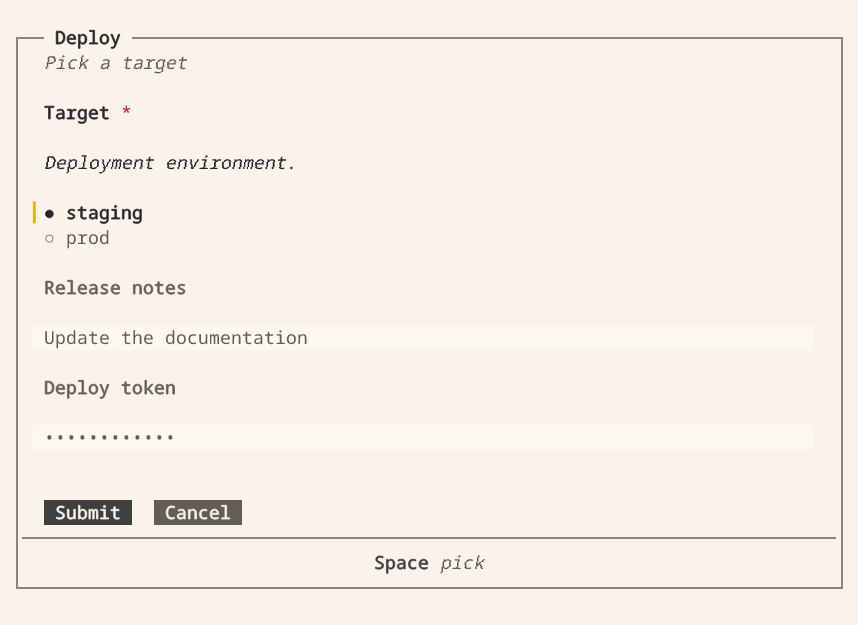
answer = vis.ask("Deploy", [
    {"name": "env", "label": "Target", "description": "Deployment environment.",
     "type": "select", "options": ["staging", "prod"], "is_required": True},
    {"name": "notes", "type": "multiline", "label": "Release notes"},
    {"name": "token", "type": "password", "label": "Deploy token"},
], description="Pick a target", timeout_ms=120000)

if answer:                       # false when cancelled, timed out or undeliverable
    deploy(answer["env"], answer.reveal("token"))
else:
    vis.log("info", "deploy skipped: " + answer.reason)
The request opens this form in the Vis terminal. Select a target, enter notes and submit. The extension resumes with the answer. Password input stays masked. Select the image to view it full size.
Request options:
| Option | Meaning |
|---|---|
description |
Markdown under the title. |
submit_label, cancel_label |
Button labels. |
is_cancellable |
False removes the cancel button. |
timeout_ms |
5 minutes by default. 0 waits until the person answers or cancels. |
Every key is a snake_case string (is_required, max_length, timeout_ms).
A camelCase or kebab-case key is refused with an error naming the right
spelling. Unknown keys are refused by name.
The answer
vis.ask never raises for a refusal. It returns an Answer that is truthy
when the person confirmed:
| Attribute | Meaning |
|---|---|
answer.values |
every field's value, defaults included (answer["env"] reads one) |
answer.reason |
cancelled, timeout, undeliverable or the host's reason when the answer is falsy |
answer.reveal(name) |
resolve a secret handle in process |
A password or otp field returns an opaque vis-secret: handle. The transcript, the logs and the
model get only the handle. When you need the value, get it with answer.reveal(name) or
vis.reveal(handle). vis.forget(handle) removes it. Do not print or log the revealed value.
If no client can display the dialog, the request immediately returns
undeliverable and logs an error rather than waiting for the timeout.
Fields
A field has a name (the key in answer.values), a label shown above the
input and an optional description shown under the label. id is accepted as
an alias for name.
type |
Answers with | Notes |
|---|---|---|
plaintext |
string | the default type |
password |
secret handle | shown as dots |
multiline |
string | |
select |
one option value | exclusive: exactly one option, never none |
multiselect |
list of option values, in declared order | inclusive: any number, and empty is legal unless required |
checkbox |
true or false |
a required checkbox must be ticked |
range |
number | min (0), max (100), step (1), and out-of-range values are refused |
otp |
secret handle | digits only, one box per digit, and min_length/max_length set the length (default 6, at most 12) |
Common keys: placeholder, default, is_required, min_length,
max_length, validate, and options for the two select types. An option is
a string, or {"value": ..., "label": ...} when the stored value and the shown
text differ. An answer naming an undeclared option is refused.
The engine enforces is_required. It rejects blank required fields on
confirmation, whether the answer comes from a dialog or an HTTP request.
Layout
Use the same row, column, grid and wrap layout vocabulary for Ask forms and
Live views. A group arranges its children in a
column (default), row, grid or wrap. Groups can nest. Each nested group uses the width
available inside its parent, not the full screen width.
A row shows its children side by side in equal columns. When the space is too narrow, the children stack: Companion stacks them one by one, and the TUI stacks the whole row. Columns always stack.
A grid puts its children in equal columns and continues on new rows, in their order. Set
max_columns (1 to 12) to limit the columns. A narrow screen shows fewer columns, and a very
narrow screen stacks them. A wrap puts its children side by side at their own width. A child that
does not fit starts a new line.
Ask groups can have a label and a plain-text description. Layout nodes
produce no answer values: a heading displays plain text and a paragraph
displays Markdown, including emphasis, inline code and lists, without an input.
The request's description also displays Markdown. Shared layout does not
change Ask validation or add Live collapse and interaction behavior to a form.
vis.ask("Where should the pool connect?", [
    {"type": "heading", "text": "Server"},
    {"type": "group", "direction": "row", "children": [
        {"name": "host", "label": "Host", "is_required": True},
        {"name": "port", "label": "Port"},
    ]},
    {"type": "paragraph", "text": "TLS is required outside the office network."},
    {"name": "tls", "label": "Require TLS", "type": "checkbox"},
])
answer.values is a flat map keyed by field name. The layout does not change it. Names must be
unique. Groups reject value keys (default, options, validate). Fields reject layout keys
(children, direction). Headings and paragraphs cannot receive focus and do not appear in the
answer.
Builders
Each node type has a builder that validates its arguments:
form = vis.ui.column(
    vis.ui.heading("Target"),
    vis.ui.paragraph("Staging does not send on-call alerts."),
    vis.ui.row(
        vis.ui.select("env", [vis.ui.option("staging", "Staging"), vis.ui.option("prod")],
                   is_required=True),
        vis.ui.slider("canary", label="Canary %", min=0, max=100, step=5, default=10),
    ),
    vis.ui.checkbox("ack", label="I read the runbook", is_required=True),
    vis.ui.password("token", label="Deploy token", is_required=True),
)

answer = vis.ask("Deploy", [form], submit_label="Deploy")
Builders: plaintext, password, multiline, select, multiselect,
checkbox, slider (the range field, named to avoid the builtin), otp,
option, row, column, group, heading and paragraph. Keyword arguments are the
field keys above.
A form takes the same components as a live view. So you can show a status, a
table or a card above the inputs. A form has its own submit and cancel buttons, so it needs no
button.
Validation
validate is a function, or a list of functions that run in order until one refuses. A validator
receives the coerced value, or the value and the flat map of every answer. To accept, it returns
None or True. To refuse, it returns a message string. This fragment assumes that your module
imports re and defines the validator is_free. is_free returns None for an available slug and
an error message for any other slug:
def a_slug(text):
    if not re.fullmatch(r"[a-z][a-z0-9-]*", text):
        return "lowercase, digits and dashes"


answer = vis.ask("Sign up", [
    vis.ui.plaintext("slug", label="Project", validate=[a_slug, is_free]),
    vis.ui.password("pass", label="Password",
                 validate=lambda text: "at least 12 characters" if len(text) < 12 else None),
    vis.ui.password("again", label="Repeat it",
                 validate=lambda text, values:
                     None if text == values["pass"] else "the two do not match"),
])
- A validator with any other signature, or a non-function such as a regex string, is refused when the request is built.
Falserefuses withis not valid. A validator that raises refuses withcould not be validated: <exception>.- Validators do not run on blank answers. Use
is_requiredto reject them. - Validation runs in the engine on confirmation. The dialog displays each field's error message. Validator functions are not sent to clients.
See also
- Extending Vis — the extension that calls
vis.ask. - Live views — display progress while an extension runs.
- Components — every component and its builder.
