Live views
A live view lets someone follow a long-running operation, such as a build,
without reading a new chat message for every update. Your extension opens it with
vis.live(...) and updates its progress, tables, logs or controls as work proceeds.
The view appears in the terminal or Companion app and can be stopped at any time.
When to use
- Your tool waits for a CI run or deployment that takes minutes. Show its jobs as they finish, as in Watch a CI run.
- You want a dashboard for several builds at once. Keep them in one view instead of one message per update.
- Errors get lost in a long log. Mark each line's severity so failures stand out.
- The person watching needs to act or stop. Add buttons, and handle interruption when they stop watching.
- Your extension needs a view that stays open between tool calls, such as a board. Open it in the side panel.
- The person must fill in values while the work runs. Collect input in the view.
- Your own program must list, read or interrupt live views. Read Sessions API.
For a tool's ordinary status, choose Activity presentation instead. Use a live view when the user needs to watch or interact with ongoing work. To ask a question and wait for the answer, use a form.
Before you start
Open an inline live view inside a registered tool or user command with a calling session, not during extension registration. A panel view is different: open it from any extension callback, also at registration. Stopping the view stops watching, not necessarily the external job.
In the terminal
The example below updates a single pane as jobs finish. Select the image to view it full size.
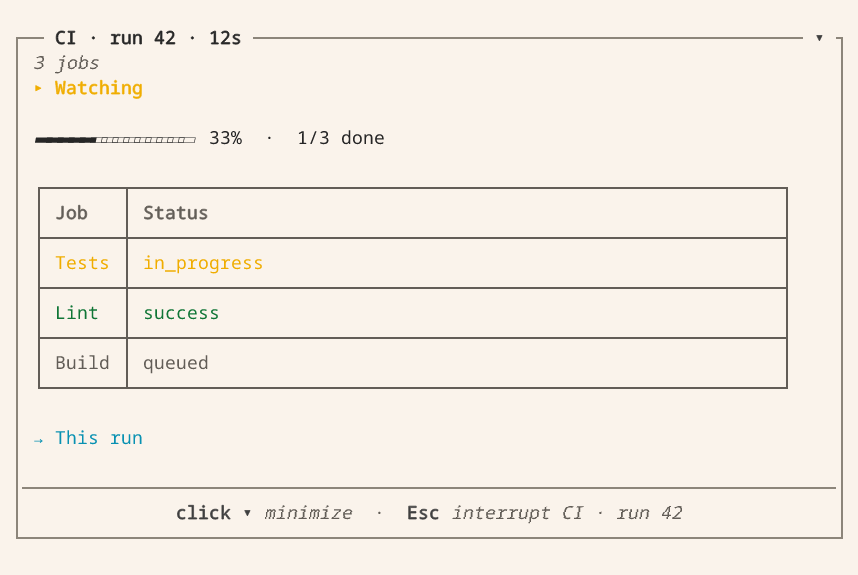
Press F3 for keyboard controls: expand a disclosure, select a row or activate a button. Press Escape to open the stop confirmation. You can add a note for the agent before stopping the view. Cancelling the confirmation keeps it running.
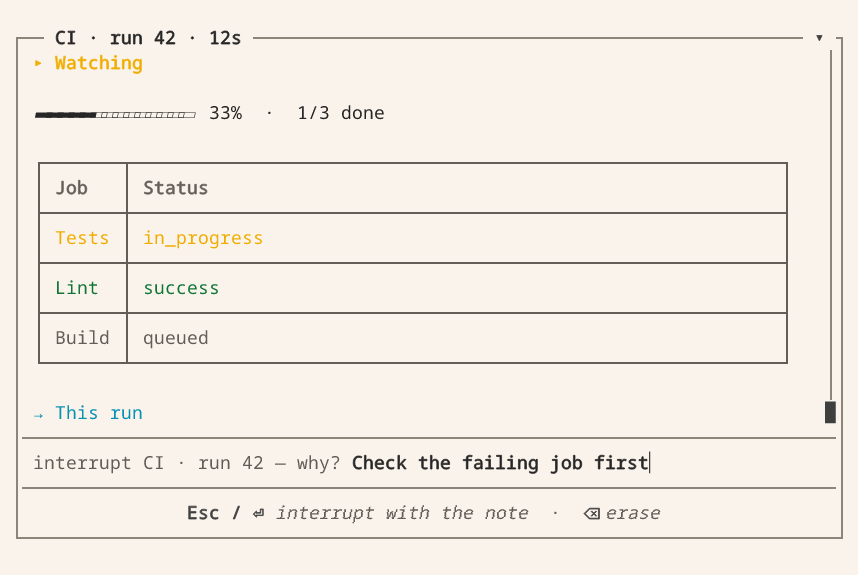
Watch a CI run
This implementation belongs in a trusted extension module. Register watch_run
with vis.Symbol to call it from Vis. It requires the GitHub CLI, authentication
and a working directory inside the target repository. run_id is a numeric Actions
run ID. The function returns the final view receipt, not a GitHub run object.
For a complete integration with typed results and error handling, use the
repository's GitHub extension.
import json
import time

import blockether.vis.extension as vis

TONES = {"": "running", "success": "ok", "skipped": "idle"}  # anything else is an error


def poll(run_id):
    done = vis.shell({"op": "background", "id": "gh",
                      "command": f"gh run view {run_id} --json jobs,status,conclusion,url"}).wait(60)
    return json.loads(done["out"])


def watch_run(run_id: int) -> dict:
    """Watch a GitHub Actions run; stopping the view does not cancel the run."""
    run = poll(run_id)
    with vis.live(
        f"CI · run {run_id} · {len(run['jobs'])} jobs",
        [
            vis.ui.status("run", "Watching", tone="running"),
            vis.ui.progress("progress"),
            vis.ui.table("jobs", columns=[vis.ui.table_column("job", "Job"),
                                       vis.ui.table_column("state", "Status")]),
            vis.ui.link("links", links=[{"id": "run", "label": "This run", "target": run["url"]}]),
        ],
    ) as view:
        seen = {}
        counts = None
        while True:
            if view.is_interrupted:
                return view.close(summary="Stopped watching before the run completed")
            for job in run["jobs"]:
                state = job["conclusion"] or job["status"]
                if seen.get(job["databaseId"]) != state:
                    seen[job["databaseId"]] = state
                    view["jobs"].upsert(str(job["databaseId"]), [job["name"], state],
                                        tone=TONES.get(job["conclusion"], "error"))
            completed = sum(1 for j in run["jobs"] if j["status"] == "completed")
            total = len(run["jobs"])
            if total and (completed, total) != counts:
                view["progress"].set(done=completed, total=total)
                counts = (completed, total)
            if run["status"] == "completed":
                break
            deadline = time.monotonic() + 5
            while (remaining := deadline - time.monotonic()) > 0:
                view.sleep(remaining)
                if view.is_interrupted:
                    return view.close(summary="Stopped watching before the run completed")
            run = poll(run_id)
        view["run"].set(run["conclusion"], tone=TONES.get(run["conclusion"], "error"))
        return view.close(summary=f"Run result: {run['conclusion']}")
GitHub can return a run before it publishes its jobs. While the count is unknown, declare progress
without a total. total=0 is invalid. When jobs appear, set both done and total. If more jobs
are added, update the total. The example keeps the last known counts across later empty polls.
Monitor a fixed build set
Use one synchronous tool and one live view to observe several already selected builds. The coordinator below runs at most two read-only requests at the same time. It uses each completed read without waiting for a slower one, and it keeps the last observation of each build. It does not launch deployments, schedule dependencies, or cancel remote jobs. The model does not need general shell access.
Supply a domain adapter read_once(build, *, deadline, stop) that returns
"running", "succeeded" or "failed" for that exact environment and build ID.
This adapter is your CI client's code, not a Vis API. It must:
- Use pinned identities, not a moving alias such as “latest”.
- Enforce the absolute
time.monotonic()deadline across connection, reads, retries and pagination, and cooperate with thethreading.Eventnamedstop. - Close responses, sockets and any per-request client in
finallyorwith. - Make only read requests. Keep authentication in the trusted extension's configuration. Do not return credentials or raw exception messages.
- Avoid Vis host calls from the reader threads. Only the invoking thread owns and updates the view.
A socket read timeout alone is not a total request deadline. Python cannot forcibly stop a running thread. Use a client with bounded operations and test its cleanup.
# monitor.py
import math
import time
from concurrent.futures import ThreadPoolExecutor
from dataclasses import asdict, dataclass
from threading import Event

import blockether.vis.extension as vis


@dataclass(frozen=True)
class Build:
    environment: str
    build_id: str


def watch_builds(builds, read_once, *, timeout_s=600.0, poll_s=5.0):
    """Observe a fixed set; return after all locally owned readers have stopped."""
    builds = tuple(builds)
    if not builds or len(set(builds)) != len(builds):
        raise ValueError("Choose a nonempty set of distinct environment/build pairs")
    if any(not b.environment.strip() or not b.build_id.strip() for b in builds):
        raise ValueError("Environment and build ID must be explicit")
    if any(not math.isfinite(n) or n <= 0 for n in (timeout_s, poll_s)):
        raise ValueError("Timeout and poll interval must be finite and positive")
    last = [{**asdict(b), "state": "unobserved", "read_error": None} for b in builds]
    due = [0.0] * len(builds)
    pending = {}
    stop = Event()
    deadline = time.monotonic() + timeout_s
    outcome = "completed"
    with vis.live("Watch builds", [
        vis.ui.status("status", "Watching pinned builds", tone="running"),
        vis.ui.table("builds", columns=[vis.ui.table_column("environment", "Environment"),
                                    vis.ui.table_column("build", "Build"),
                                    vis.ui.table_column("state", "Last observation")]),
    ]) as view:
        pool = ThreadPoolExecutor(max_workers=2, thread_name_prefix="ci-reader")
        try:
            for i, row in enumerate(last):
                view["builds"].upsert(str(i), [row["environment"], row["build_id"],
                                              row["state"]])
            while True:
                if view.is_interrupted:
                    outcome = "interrupted"
                    break
                # Never call result() on an unfinished future or use ordered map().
                for future in [f for f in pending if f.done()]:
                    i = pending.pop(future)
                    try:
                        state = future.result()
                        if state not in {"running", "succeeded", "failed"}:
                            raise ValueError("Unknown build state")
                        last[i]["state"] = state
                    except Exception as error:
                        # A read error is not a failed CI build or a successful read.
                        last[i]["read_error"] = type(error).__name__
                    due[i] = time.monotonic() + poll_s
                    row = last[i]
                    view["builds"].upsert(str(i), [row["environment"], row["build_id"],
                                                  row["read_error"] or row["state"]])
                if any(row["state"] == "failed" for row in last):
                    outcome = "failed"
                    break
                if any(row["read_error"] for row in last):
                    outcome = "observation_error"
                    break
                if all(row["state"] == "succeeded" for row in last):
                    break
                now = time.monotonic()
                if now >= deadline:
                    outcome = "timeout"
                    break
                for i, build in enumerate(builds):
                    if len(pending) == 2:
                        break
                    if (i not in pending.values() and due[i] <= now
                            and last[i]["state"] != "succeeded"):
                        pending[pool.submit(read_once, build,
                                            deadline=min(deadline, now + 5.0),
                                            stop=stop)] = i
                # Futures do not wake the view. Check them within 100 ms; Stop
                # wakes this host wait immediately. UI events do not reset due[].
                view.sleep(min(0.1, max(0.0, deadline - time.monotonic())))
        except vis.Interrupted:
            # Stop can race with any view update, not just the explicit flag read.
            outcome = "interrupted"
        except BaseException:
            outcome = "failed"
            raise
        finally:
            stop.set()
            try:
                reason = "failed" if outcome == "observation_error" else outcome
                receipt = view.close(reason=reason, summary=f"Monitor: {outcome}")
            finally:
                pool.shutdown(wait=True, cancel_futures=True)
        if receipt["reason"] == "interrupted":
            outcome = "interrupted"  # a concurrent human Stop takes precedence
    return {"outcome": outcome, "observations": last, "view": receipt}
Register only the typed wrapper, not the callback-taking coordinator. For example,
with monitor.py and your domain client installed in the extension's
project environment:
# .vis/extensions/ci_monitor.py
import blockether.vis.extension as vis
from monitor import Build, watch_builds
from my_ci import read_build  # your bounded, read-only adapter described above


def watch(builds: list[Build], timeout_s: float = 600.0) -> dict:
    """Watch these exact builds together. Stop watching never cancels remote jobs."""
    return watch_builds(builds, read_build, timeout_s=timeout_s)


def present(*, phase, args, kwargs, result, error):
    if phase == "start":
        summary = "Watching the selected build set"
    elif phase == "failure":
        summary = f"Monitoring could not finish: {type(error).__name__}"
    else:
        summary = f"{result['outcome']}: {len(result['observations'])} builds"
    return vis.ActivityPresentation("Watch builds", summary)


vis.register_extension(vis.Extension(
    name="ci-monitor", alias="ci", description="Read-only monitoring of pinned CI builds.",
    symbols=[vis.Symbol(watch, name="watch_builds",
                        activity=vis.Activity(label="Watch builds", render=present))],
))
Fail-fast and cleanup are separate. When a completed read reports failure, the coordinator
schedules no new work. The view closes before the coordinator joins slower readers. The caller
returns only after those readers finish their bounded cleanup. Future.cancel() cannot kill a
request that is already running.
Do not replace this with shutdown(wait=False). That leaves work running after the return, with no
sign of it. Snapshots are the last observations used before the stop. unobserved does not mean
running or successful. Late results during cleanup do not overwrite the snapshots.
This is not durable background execution. The open live view suspends the invoking block's ordinary wall-time limit, not network deadlines or the recipe's explicit overall timeout. A synchronous call still occupies its caller: the model cannot call a second “stop” tool on that same blocked call. Use the UI or an independent SDK client. There is no monitoring after return and no recovery across a worker or gateway restart.
Before you ship your adapter, test these cases:
- A fast failure beside a slow read.
- Successful completion.
- Stop during waiting and during updating.
- Request errors.
- The overall timeout.
- Release of every locally owned thread and response.
The repository's
recipe tests
run these code blocks with controlled readers and LiveRecorder. They do not check your CI service
or credentials.
Nodes
A view declares its nodes once, each with an id, and addresses them by id.
view[id] returns a typed handle with only the verbs its node type supports:
| Builder | Shows | Verbs on view[id] |
|---|---|---|
vis.ui.status(id, text, tone=…, detail=…) |
status text with an optional detail line | .set(text, tone=, detail=, label=) |
vis.ui.progress(id, total=…) |
a bar | .set(value=, done=, total=) |
vis.ui.stat(id, stats=[…]) |
a strip of counters | .set(stat_id, value_text, label, tone=), .remove(*ids), .clear() |
vis.ui.steps(id, steps=[…]) |
a checklist | .set(step_id, label, tone=, detail=, value=), .remove(*ids), .clear() |
vis.ui.output(id, label=…, default_expanded=False) |
independently collapsible retained lines | .write(*lines, tone=), .clear() |
vis.ui.table(id, columns=[vis.ui.table_column(…)], groups=[vis.ui.table_group(…)]) |
rows keyed by id, optionally folded into groups | .upsert(row_id, cells, tone=, parent=), .group(group_id, label=, tone=, order=, is_open=), .select(*row_ids), .remove(*ids), .clear() |
vis.ui.link(id, links=[…]) |
links a person can open | .add(link_id, label, target, target_kind=, tone=) |
vis.ui.paragraph(id, text) |
a paragraph with inline formatting | .set(text) |
vis.ui.heading(id, text, level=2) |
a heading at level 1–6 | .set(text, level=) |
vis.ui.divider(id) |
a horizontal rule between sections | none (use view.add(...) or view.drop(id)) |
vis.ui.code(id, text, language=None) |
literal, whitespace-preserving code | .set(text, language=) |
vis.ui.spinner(id, text="Working", variant="braille") |
an explicit activity indicator | .set(text=, variant=, is_active=) |
vis.ui.button(id, label, is_disabled=False) |
an operator action | .set(label=, is_disabled=) |
vis.ui.disclosure(id, label, *nodes, default_expanded=False) |
a collapsible column | children update by their own ids |
vis.ui.output(...) builds a log node. It is named output so it never shadows
vis.log, the engine log line.
To update a status without changing its detail, omit detail. To remove the
detail line, pass detail="":
view["state"].set("Polling", detail="Waiting for jobs")
view["state"].set("Running")             # Keeps the detail.
view["state"].set("Complete", detail="")  # Clears the detail.
Keyed updates insert new ids or update existing ones without changing their position. Log lines have
no ids and are appended. .clear() removes both displayed and recorded lines.
Each log starts collapsed and has its own expanded state. Expanding one never opens another. Patches
keep the reader's choice. default_expanded=True changes only the first active state. Completed
receipts start collapsed again. When you expand one, its saved output is still there.
A live view shows the whole log. When you open a log, Companion and the TUI both read the record
back to its first line. So they show output that arrived before your surface attached, not only a
count of it. window_lines only sets the size of two tails: the tail the model reads and the tail a
client gets when it attaches. It never hides output from you.
While the earlier lines are still loading, one line tells you so. The same line also tells you when a read fails. Search reaches the record in both cases.
Expanded logs offer Search in Companion and Search log through the TUI's F3 controls or
pointer. Search finds a literal, case-insensitive substring across the saved record, including lines
outside window_lines and closed views. Results include original one-based line numbers and come in
pages of 200. They are a snapshot, and Refresh results adds new output. Clearing a log resets
its searchable history. Search never sends an action to the producer.
In Companion, Clear search or Escape in the search field restores normal output. / while the
output is focused moves focus to search. Without a record loader, the panel
explicitly limits search to loaded lines. In the TUI, an empty query browses the
record, Enter opens a full wrapped line, and Escape cancels an in-flight read.
A client reads the record of a log node in pages with the Sessions
API. A request names the log node and takes query, from and
limit. from is a zero-based match offset. An empty query matches all lines.
The response includes lines, line_numbers, matched and total. The gateway caps pages at the
default log-window size. It streams the record and keeps only the requested result page. Styled
pages also include line_tones, aligned with lines. A null entry means plain text.
Add severity to streaming output
Use view["log"].write(..., tone="error") to distinguish compiler failures,
warnings and successful steps without treating a mixed build log as one source
language. The typed vis.LogTone values are "idle", "running", "ok", "warn"
and "error". Omitting tone keeps the plain-text default. A tone applies to all
lines in that call, not to later calls.
with vis.live("Build output", [vis.ui.output("log", label="Build log")]) as view:
    view["log"].write("10:42:00 INFO $ npm test")
    view["log"].write("10:42:01 WARN cache unavailable", tone="warn")
    view["log"].write("10:42:02 ERROR compiler failed", tone="error")
    view["log"].write("    at compile (src/build.ts:42:7)")
Keep severity words in the text so the log also makes sense without color. TUI and Companion use their theme's semantic colors. Plain stderr and Markdown receipts keep the same readable text. Companion's search results keep colors. The TUI's search and full-line dialogs provide a plain-text fallback. Completed live-view receipts keep the style metadata and the original line numbers.
Redact secrets before you call write or seed lines. Engine presentation redaction is an
extra safeguard. It does not detect every kind of secret. Styles are separate metadata. They never
divide, hide or replace text before redaction, search or copying. HTML and URLs in output stay
literal, not links or executable markup.
ANSI is not a styling API. C0/C1 controls other than tab and newline show as visible \uXXXX text
(for example, Escape becomes \u001b). Cursor moves, OSC links, clipboard escapes and color escapes
are never executed.
Each argument to write is one complete line of the record, not a raw network fragment. In your
adapter, decode and assemble partial lines before you redact and append them. Append incremental
output. Do not clear and replace snapshots.
Successive batches keep their own tones, even when updates are coalesced. Styling does not change
window_lines, retention or search pagination. The earlier pages that a surface reads back keep the
tones they were written with. Use vis.ui.code(..., language=...) for a separate snippet in a known
language, not to reinterpret the mixed log.
For raw wire clients, an append operation can carry tone only for a log node. Log snapshots can
carry line_tones, with one tone or null per line. Clojure uses :tone on log append operations
and :line-tones on seeded log nodes. These closed enums accept no CSS, free-form color values,
HTML or terminal commands.
Add spinners and buttons
Spinner variants are braille, dots, line and pulse. Set is_active=False
to stop one without removing its text. Completed receipts never animate, and the
app respects reduced-motion preferences.
Buttons are real actions, not links or serialized callbacks. An accepted press
increments that node's clicks in shared state and wakes view.sleep(...).
Read it with view.state(), then let the producer decide what to do. Disabled
buttons and completed receipts reject activation. Treat an unconfirmed network
request as uncertain: check state before retrying a consequential action.
with vis.live("Review", [
    vis.ui.heading("title", "Build review", level=1),
    vis.ui.paragraph("intro", "Read the output before continuing."),
    vis.ui.code("example", "print('ready')", language="python"),
    vis.ui.spinner("waiting", "Waiting for review", variant="dots"),
    vis.ui.disclosure("details", "Build details",
                   vis.ui.output("tests", label="Test output"),
                   vis.ui.output("build", label="Build output")),
    vis.ui.divider("review-actions"),
    vis.ui.button("continue", "Continue"),
]) as view:
    view["tests"].write("Tests passed")
    while not view.is_interrupted:
        state = view.state()
        if not state:
            break
        pressed = next(n for n in state["nodes"] if n["id"] == "continue")
        if pressed["clicks"]:
            view["continue"].set(is_disabled=True)
            view["waiting"].set("Review accepted", is_active=False)
            break
        view.sleep(60)
With one argument, vis.ui.heading(text) and vis.ui.paragraph(text) remain form
decorations. Two positional arguments declare addressed live nodes.
Tables support order="insertion" (default), "newest-first" or
{"by": "duration", "dir": "desc"}. Rows that share a parent="tests" appear under one collapsible
group. The group stays closed until the reader opens it. Every surface shows that group the same
way, with its name and the number of rows it holds. So keep the name stable and let Vis do the
counting.
A group that you never declare gets its id as its name. It sorts after the declared groups, in the order its first row arrived.
Declare a group when you want to name, color or order it. When you build the table, use
vis.ui.table_group("tests", label="Tests", tone="error", order=0). While the run moves, use
view["jobs"].group("tests", tone="error").
Declarations merge by id, so a later call changes only the keys it passes. Renaming a group keeps
the reader's fold. is_open=True opens the group when it first arrives. After that, the reader's
own choice stands. A declared group that holds no rows is not shown.
With is_selectable=True, users can select rows. Read the selection with
view.state().
When a view has exactly one node of a type, its verb is available on the view
itself: view.status(...), view.progress(...), view.write(...),
view.row(...). To change the layout while a view runs, see
Layout and text.
Layout and text
Use vis.ui.row(id, *nodes), vis.ui.column(id, *nodes), vis.ui.grid(id, *nodes) and
vis.ui.wrap(id, *nodes) to arrange nodes with the same layout vocabulary as
Ask forms.
Every Live group has an id. Groups can nest. Each nested group uses the width
available inside its parent, not the full screen width.
In Companion, rows use equal-width columns with a minimum width of 12rem,
wrapping into fewer columns as space narrows and eventually stacking. A single
column can shrink below that minimum to fit a very narrow panel. In the TUI,
rows use equal-width columns when each child has at least 24 terminal text cells
after spacing. Otherwise the entire row stacks vertically. Columns always stack.
Use a grid for many nodes of the same kind, such as cards. It shows equal columns
and continues on new rows. vis.ui.grid(id, *nodes, max_columns=3) limits the
columns. A narrow panel shows fewer columns, and a very narrow panel stacks them.
In the TUI, each grid column also needs 24 terminal text cells.
Use a wrap for nodes that keep their own width, such as buttons, stats and statuses. They stand side by side and continue on a new line when the next one does not fit. Buttons in a grid or a wrap stay interactive on both surfaces.
vis.ui.column("board",
           vis.ui.grid("services", *cards, max_columns=3),
           vis.ui.wrap("actions",
                    vis.ui.button("approve", "Approve release"),
                    vis.ui.button("rerun", "Run checks again")))
Declare at least one child in every vis.ui.row, vis.ui.column, vis.ui.grid,
vis.ui.wrap and vis.ui.disclosure. These Python builders raise ValueError immediately when
called without children. If you do not have any nodes yet, wait to add the
group until its first child is available.
Use view.add(node) to append a top-level node. With after=, the new node
becomes the named node’s next sibling in the same container:
view.add(vis.ui.column("builds", vis.ui.status("linux", "Queued")))
view.add(vis.ui.status("macos", "Queued"), after="linux")  # Inside builds.
view.add(vis.ui.status("summary", "Watching"), after="builds")  # After the group.
To grow a group, name one of its children in after=, not the group itself.
Remove a node with view.drop(id). Removing a group also removes its children.
Groups preserve their children’s live interactions and do not produce form
answer values.
Use vis.ui.divider("section-break") between sections, like an HTML <hr>. It fills
its current container’s width in the terminal and Companion, including inside
columns and disclosures, and remains visible in completed receipts. A divider
has only an id: it has no label, content, style options or update verbs. Use a
heading for a section title, and view.drop("section-break") to remove the rule.
The Clojure builder is (view/divider "section-break"). The wire node is
{"id": "section-break", "type": "divider"}.
Display text accepts inline Markdown: `code`, **bold**, _italic_ and links. Status text
wraps and is justified within its column.
Log lines and code blocks are never executed. Terminal controls in logs show as visible escapes. Other text stays literal. There is no general Markdown node. Each node type has its own Markdown output.
Updating
view.sleep(seconds)blocks in the host until the view changes, closes or the timeout expires. It returnsTruefor a change or close,Falsefor a timeout. There is no periodic state polling while it waits, and an unchanged timeout returns no view payload. Use it instead oftime.sleepin view loops.- Waiting does not publish view updates or activity. Send only changed data. External services still need their own polling interval. A click or Stop should not trigger another GitHub request. The example keeps a five-second deadline even when a view event wakes it early.
- Wait durations must be finite and at most 86400 seconds. Nonpositive durations
return
Falsewithout a host call. with view.batch(): ...sends multiple node changes as one patch.- The first update is sent immediately. Further updates within
flush_ms(100 ms by default) are batched. Set the interval withvis.live(..., flush_ms=…). Reads andview.close(...)flush pending updates. - An open live view suspends the invoking block's ordinary wall-time limit. Set explicit deadlines for external requests and for monitoring as a whole, and close the view when work ends. This is not a durable worker lifetime.
Interruption
The user can stop watching at any time. In the terminal, Escape opens a stop confirmation with an
optional note. Escape or Enter confirms. Backspace on an empty line resumes watching. The
Companion app's Interrupt button opens the same input.
view.is_interruptedis true if the view ended without the extension closing it. Reading it uses at most one host call per batching interval.view.is_from_humanis true when the user stopped the view.view.notecontains their note orNone.- After the user stops a view, the agent step that opened it cannot open another live view. Vis adds the stop and the note to the output that the agent reads.
- Updating an ended view raises
vis.Interruptedwith the note, even if the loop does not check the flag. - From the producer,
view.close(reason="interrupted", summary="Stopped monitoring")closes the owned view. It does not kill threads or remote jobs. - From an independent client, interrupt the view with the Sessions
API. The action is
interrupt, notcancel. The producer must still handleview.is_interruptedorvis.Interruptedand clean up its resources.
Closing
view.close(reason=…, summary=…, error=…, artifact_id=…, selection_snapshots=…, model_result=…) ends the view and returns is_completed, reason,
is_from_human, note, the final view state and summary. In Vis, the
model's returned view is budgeted. Clients and saved artifacts preserve the
group hierarchy and the current log window.
model_resultreplaces the model's result with a string. Clients and the saved artifact still receive the full view state. A concurrent user stop takes precedence and returns an interruption result.- Repeated closes return the first result. Exiting a context manager closes
the view. An exception closes it with reason
failed. selection_snapshotsstores alternate states for selectable rows in the artifact, so users can inspect them after the extension exits. The limit is 500 snapshots and 1 MiB.
Choose a placement
placement decides where a view appears and how long it stays open.
| Placement | Where it appears | Lifetime |
|---|---|---|
inline (default) |
In the transcript, under the step that opened it | Closes when its tool call or block ends |
panel |
In the side panel of one session | Stays open until your extension closes it or unloads |
Only extension code can open a panel view. The python_execution sandbox refuses it. A panel
view needs a key. Your extension and the key own one view, so a second
vis.live with the same key replaces the first view.
import blockether.vis.extension as vis

BOARD = {}


def handle(event):
    if event.type == "activate" and event.node_id == "refresh":
        BOARD["view"]["state"].set("Refreshing", tone="running")


def open_board(session_id):
    BOARD["view"] = vis.live(
        "Release board",
        [vis.ui.status("state", "Idle", tone="idle"), vis.ui.button("refresh", "Refresh")],
        placement="panel",
        key="release-board",
        session_id=session_id,
        on_event=handle,
    )
- Open the view in a callback, such as a tool call, a command or registration code. After that, threads of your extension can also change, read and close it.
session_idselects the session of a panel view.- Vis saves the last state of a panel view. After a gateway restart, the view shows that state as stale until your extension loads again. Open your views again when your extension loads. If the load does not open the same key, Vis closes the stale view.
Collect input in a view
A live view can hold the same inputs as a form. Each input keeps its
value while the view is open, and every surface shows the same value.
def choose_target() -> str | None:
    """Show a deploy form in a live view and return the chosen target."""
    with vis.live("Deploy", [
        vis.ui.group("target",
                  vis.ui.select("env", ["staging", "prod"], label="Target", is_required=True),
                  vis.ui.multiline("notes", label="Notes"),
                  vis.ui.button("deploy", "Deploy", action="submit")),
        vis.ui.status("state", "Waiting for a target", tone="idle"),
    ]) as view:
        while not view.is_interrupted:
            for event in view.events(timeout=60):
                if event.type == "submit" and event.node_id == "deploy":
                    view["state"].set(f"Deploying to {event.values['env']}", tone="running")
                    return event.values["env"]
    return None
A person action becomes a vis.LiveEvent:
type |
When | Fields |
|---|---|---|
change |
A person changes an input | node_id and value. A secret input gives only is_set. |
activate |
A person presses a button or a selectable card | node_id |
submit |
A person presses a button with action="submit" |
node_id and values of the inputs in the group of the button |
view.values()returns the current value of each input by id. Secret inputs are left out.view.events(timeout=None)returns the events since the last call. Withtimeout, it waits up to that many seconds for the first new event.view.on_event(callback)callscallback(event)for each event thateventsorsleepreads.- In a panel view,
vis.live(..., on_event=callback)gets each event from the host. The callback runs as an extension callback with the view session bound. So it can callSession.sendorvis.sessions.create. view[id].valuereads one input.view[id].set(value)changes it.
A submit checks each required input and each validator of the group first. A bad value shows an
error at its input, and the view stays open. A password or otp value never reaches the
transcript, the saved view or a log. The submit event gives a vis-secret: handle for it.
Side panel
People find panel views in these places:
- Terminal. Ctrl+X V opens the side panel, then moves the focus between the panel and the transcript. The panel docks at the right when the chat keeps 60 columns, else it opens over the chat. Keyboard shortcuts lists the keys of the panel.
- Companion app on a desktop or tablet. The side panel docks at the right of the session, and you can drag its edge to resize it.
- Companion app on a phone. The panel icon next to Settings opens the panel as a full page.
When views of several extensions are in one panel, each extension gets its own tab.
Testing a view
Outside Vis, a live view writes its transcript to stderr and maintains the
same state. vis.testing.LiveRecorder records updates and simulates user
actions:
import blockether.vis.extension as vis

recorder = vis.testing.LiveRecorder(vis._host)
monkeypatch.setattr(vis, "_host", recorder)

run_extension()
recorder.select("jobs", ["macos"])       # a human action
assert recorder.node("jobs")["selected_ids"] == ["macos"]
assert recorder.patched()                # ops the extension emitted
result = recorder.close(reason="interrupted")
recorder.ops() returns the recorded operations for comparison with expected
output. vis.testing.assert_tree(actual, expected) reports nested differences.
See also
- Extending Vis — the extension that opens a view.
- Forms and user input — the same components, used for questions.
- Components — every component and its builder.
- Sessions API — list, read and interrupt live views from a program.
